Eventtia Changelog
connect.eventtia.com Β· Release timeline Β· 158 posts
Changelog

Eventtia Changelog

Eventtia first version release notes

146 releases Β· last year
Jul 2025 Jul 2026
Jun 30
2026
Latest release Improvement yesterday

Sold-Out Attendee Types Hidden From Registration

Public registration forms now automatically hide attendee types that have no remaining seats, so attendees only see options they can actually select.

Why it matters: This eliminates the frustration of registrants choosing a ticket type only to discover it's unavailable, reducing drop-offs during registration and cutting down on support requests about sold-out categories.

Jun 30
2026
Improvement yesterday

🎨 A Fresh, Faster Way to Manage Event Files

Event Files has a brand-new look and feel, making it easier than ever to organize, upload, and share documents tied to your events.

Why it matters: managing event documentation is one of those behind-the-scenes tasks that quietly eats up time. The redesigned interface reduces clicks, surfaces what you need faster, and brings Event Files in line with the rest of the modern Eventtia experience β€” so your team spends less time hunting for files and more time running great events.

  • Refreshed file list and category views with a cleaner, more consistent layout
  • Redesigned upload modal for a smoother, more intuitive file-adding experience
  • Confirmation modal when deleting files and categories to help prevent accidental loss
  • Updated empty states so it's clear what to do when a category has no files yet
Jun 22
2026
Improvement 8 days ago

🎨 Refreshed Email Account Experience

The email account section now sports a modern, cleaner interface designed to make managing your sending domains and SMTP settings faster and more intuitive.

Why it matters: A clearer layout means less time hunting for settings and fewer mistakes when configuring your email infrastructure β€” so your campaigns get out the door faster.

  • Redesigned interface with refreshed icons and visual styling
  • Improved navigation across email account configuration screens
  • Updated Tailwind styling for a more consistent look and feel
Jun 22
2026
Improvement 9 days ago

🎨 Cleaner Group Ticket Emails

We've refined how group tickets appear in attendee email notifications, making registration confirmations easier to read and act on.

Why it matters: When attendees receive their group ticket emails, clarity is everything. This update ensures the ticket information is presented in a more polished and consistent way, reducing confusion and follow-up questions from your attendees.

Jun 19
2026
Improvement 12 days ago

⚑Reliable Attendee Limits Under High Traffic

Attendee registration now holds firm even when hundreds of people sign up at the exact same moment. We've reworked how registration limits are enforced to eliminate race conditions that could previously allow events, tickets, or workshops to exceed their capacity during simultaneous sign-ups.

Why it matters: When a popular event opens registration, dozens of attendees often click 'Register' within the same second. Without proper concurrency controls, multiple requests could each see an available spot and all succeed, leaving organizers to deal with overbooked sessions and disappointed attendees. This update ensures your capacity numbers are the truth, every time.

Jun 16
2026
Improvement 14 days ago

⚑Faster Event Page Loads

Event pages now load noticeably faster thanks to optimized event parameter queries on the backend.

Why it matters: Less waiting means smoother navigation for organizers managing busy events, and a better first impression for attendees landing on your event pages.

Jun 12
2026
Improvement 18 days ago

🚨Clearer Workshop Capacity Messages for Attendees

We've refined the messages attendees see when a workshop has reached its registration limit, making them easier to understand across all supported languages.

Why it matters: Clearer wording reduces attendee confusion and support requests when workshops fill up, helping participants quickly understand their options and choose alternative sessions without friction.

Jun 10
2026
Improvement 21 days ago

πŸ—ƒοΈRicher Location Data in Webhook Payloads

Webhook payloads now include detailed location information for both events and attendees, giving your integrations a clearer picture of where things are happening without extra API calls.

Why it matters: external systems like CRMs, analytics tools, and marketing platforms can now segment, route, and report on data by city right out of the box β€” saving time and reducing the need for follow-up lookups.

  • Event webhook payloads now include location and city details
  • Attendee webhook payloads now include city information
  • Improved city data resolution through a new caching layer for faster, more reliable delivery
Jun 5
2026
Improvement 26 days ago

🎨 A Fresh, Faster Sponsors Module

The Sponsors module has been fully redesigned to match our latest interface standards, giving you a cleaner, more consistent experience when managing sponsors, sponsor categories, files, and tags.

Why it matters: managing sponsors is one of the most repetitive tasks during event setup. With a refreshed layout, clearer action buttons, and improved forms, your team can move through sponsor configuration with fewer clicks and less visual friction.

  • Redesigned sponsor and sponsor category listing pages with better-aligned tables and improved category color display
  • New side-screen forms for creating and editing sponsors and sponsor categories, consistent with the rest of the platform
  • Refreshed file upload modal and file list for sponsor assets, making it easier to attach and review documents
  • Improved tags interface with a smoother editing experience
  • Updated breadcrumbs and action buttons across all sponsor-related screens
  • Enhanced searchable dropdowns (TomSelect) in sponsor forms for quicker selection
  • Localized labels and copy refreshed across all supported languages, including Japanese, Traditional Chinese, Vietnamese, Arabic, German, Spanish, and French
Jun 5
2026
Improvement 26 days ago

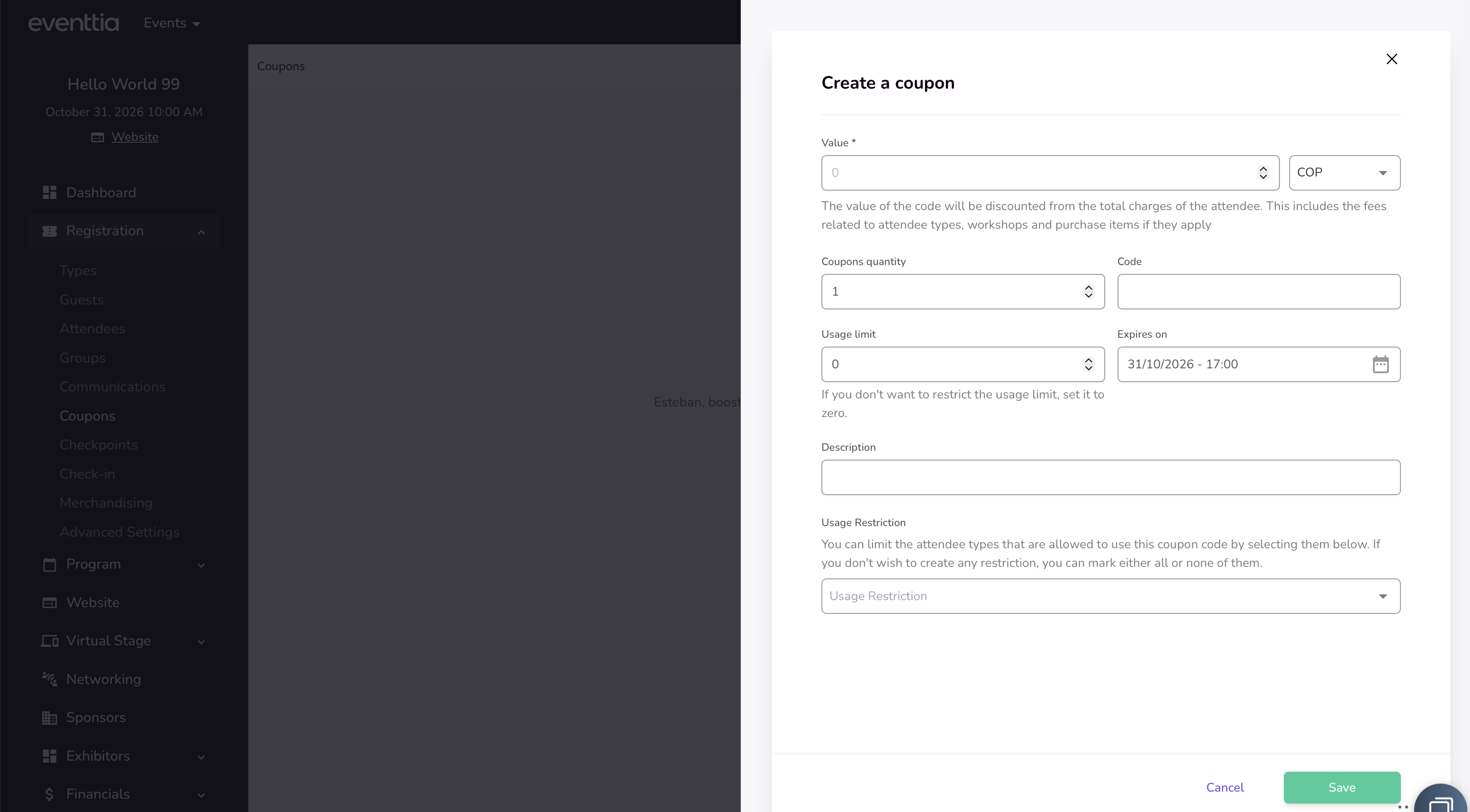
🎨 A Fresh, Faster Way to Manage Coupon Codes

Coupon code management just got a modern makeover. The entire coupon codes section has been redesigned to match the latest Eventtia interface, giving organizers a cleaner, more intuitive workspace for creating, editing, and tracking promotional codes across their events.

Why it matters: managing discounts is now faster and less error-prone, so you can spend less time clicking through forms and more time driving registrations.

  • Redesigned coupon codes list view with improved readability and easier scanning
  • New streamlined modal for creating coupon codes with clearer field organization
  • Refreshed edit screen, including a cleaner "used by" table so you can quickly see which attendees redeemed each code
  • Added quick delete action directly from the edit view
  • Updated translations across all supported languages for consistent terminology
  • Improved Excel export experience for coupon code data
Jun 5
2026
Improvement 26 days ago

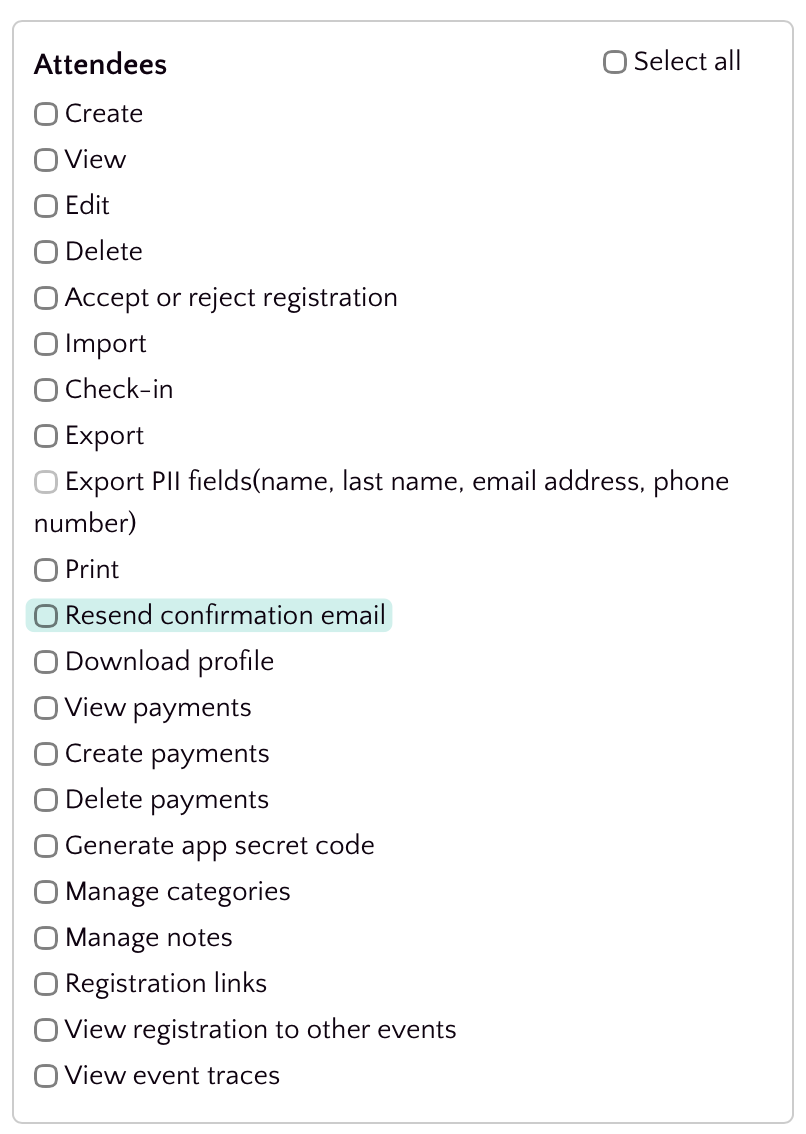
Permission-Based Access for Bulk Welcome Email Resends

Resending welcome emails to multiple attendees at once is now gated behind a dedicated permission, giving organizers tighter control over who can trigger mass communications from the attendee list.

Why it matters: bulk email actions can have a big impact on attendee experience and deliverability. By requiring an explicit permission, teams can prevent accidental sends, delegate the task safely, and keep a clearer audit trail of who can reach out to attendees in bulk.

May 27
2026
Improvement 1 month ago

🎨 A Cleaner, Faster Way to Manage Program Categories

Program categories just got a fresh, modernized look that makes organizing your event sessions feel effortless. We've redesigned the categories interface from the ground up so you can spend less time hunting for controls and more time building great agendas.

Why it matters: organizing sessions by category is one of the most repeated tasks when setting up an event. A clearer layout, smoother edit experience, and consistent visual style cut down on clicks and confusion, especially for teams managing large multi-track programs.

  • Redesigned categories index with an updated, easier-to-scan layout
  • New centered modal for editing categories, keeping focus on the task at hand
  • Refined alerts and inline messages for clearer feedback when saving changes
  • Added a + icon to make creating a new category more discoverable
May 25
2026
Improvement 1 month ago

Faster, More Focused Badge & Stand Reports

Badge and stand reports have been redesigned to give you cleaner layouts, faster exports, and more relevant data β€” so you can pull the insights you need without wading through clutter.

Why it matters: organizers spend less time wrestling with reports and more time acting on them. Smaller, purpose-built exports also generate faster and are easier to share with sponsors and exhibitors.

  • Redesigned attendee type summary report with a clearer, more readable layout
  • Stand reports split into four focused exports: Badges, Leads, Requirements, and Summary β€” each tailored to its audience
  • New filter on the attendee type summary report so you can narrow results before exporting
  • Updated terminology around reservations metadata for greater consistency across the platform
  • Badge and registration reports reorganized under the Registration Reports section for easier navigation
May 21
2026
Improvement 1 month ago

Attendee Location Now Included in Webhook Payloads

Attendee webhook payloads now include location information, so downstream systems receive a more complete picture of each attendee without needing additional API calls.

Why it matters: If you sync attendees to CRMs, marketing tools, or analytics platforms, location data is often essential for segmentation, reporting, and personalization. Including it natively in the webhook payload removes an extra integration step and keeps your data fresher.

May 15
2026
Improvement 1 month ago

Track User Activity with Last Sign-In Data

The /api/v3/users endpoint now returns each user's last sign-in timestamp, giving you immediate visibility into account activity directly from the API response.

Why it matters: teams building integrations, audits, or engagement reports no longer need extra calls or workarounds to know when a user was last active β€” the data is right where you expect it, making it easier to identify inactive accounts, monitor adoption, and power activity-based workflows.

May 15
2026
Improvement 1 month ago

Cloned Events Keep Their Modules

When you clone an event, your previously enabled modules now carry over automatically β€” no more reconfiguring from scratch for every new edition of a recurring event.

This saves time and prevents the common mistake of launching a cloned event with missing functionality, ensuring your duplicated events behave exactly like the original from day one.

May 13
2026
Improvement 1 month ago

Refreshed Merchandise Module β€” Manage Products with a Modern Interface

The Merchandise module has been completely redesigned with a fresh, modern look that makes managing your event products faster and more intuitive. Every screen β€” from the product listing to creation and editing β€” now follows our updated design language for a more consistent experience across the platform.

Whether you're setting up ticket add-ons, branded swag, or any purchasable items for your event, you'll notice a cleaner layout, improved forms, and smoother workflows that help you get things done with fewer clicks.

Here's what's new in the updated Merchandise module:

  • 🎨 Redesigned product listing page β€” A cleaner index view with improved column layouts, better price display, and a progress bar for purchase tracking at a glance.
  • πŸ“ Improved product creation & editing forms β€” The create and edit flows now open in a sleek side-screen modal, making it easy to add or update products without losing context.
  • πŸ”€ Drag-and-drop reordering β€” You can now rearrange the display order of your merchandise items by simply dragging and dropping them in the list. No more manual sorting!
  • πŸ“„ Pagination improvements β€” The product list now paginates correctly, keeping things fast and organized even when you have a large catalog.
  • 🌍 Multi-language support updated β€” Labels and translations across all supported languages (Arabic, Catalan, German, Spanish, French, and more) have been refreshed to match the new interface.

This redesign reduces the time it takes to set up and manage event merchandise, giving organizers a smoother experience and helping them focus on what matters β€” delivering a great event.

May 8
2026
Improvement 1 month ago

🎨 Refreshed Stand Requirements Report

The Stand Requirements Summary Report has been redesigned with an updated look and feel, making it easier to review and export booth requirement data for your events.

Whether you're coordinating exhibitor needs or generating reports for your operations team, the refreshed interface provides a cleaner, more intuitive experience β€” helping you find the information you need faster and with less friction.

  • Modernized visual design for the stand requirements summary report
  • Improved search and filtering with updated parameter handling
  • Refined Excel export process for stand requirement data
  • Styling and layout fixes for better readability
May 5
2026
Improvement 1 month ago

Browse Your Registration Report Without Losing Context

The registration report section on your event dashboard is now scrollable, so you can navigate through large datasets without the entire page stretching endlessly.

If you manage events with a high volume of registrations, you've likely experienced an oversized dashboard that made it hard to quickly jump between sections. With this update, the registration report is contained within a scrollable area, keeping the dashboard compact and easy to navigate β€” so you spend less time scrolling past data and more time acting on it. πŸ“Š

Apr 29
2026
Improvement 2 months ago

🎨 Refreshed Meeting Evaluations Report

The Meeting Evaluations report in the Networking Reports section has been completely redesigned with a modern, cleaner interface that's easier to navigate and faster to use.

If you rely on post-meeting survey data to measure networking quality, you'll now spend less time wrestling with the report and more time acting on insights.

  • Redesigned filters and survey selector for quicker access to the data you need
  • Improved Excel export with correct .xlsx file extension and accurate progress tracking
  • Fixed filtering behavior so reports reflect the correct survey responses
Apr 29
2026
Improvement 2 months ago

Emoji Validation in Forms and Fields

Input fields across the platform now properly validate and handle emoji characters, preventing unexpected errors or data corruption when attendees or organizers include emojis in their submissions.

This means fewer form submission failures and a smoother experience for everyone β€” especially in international events where emoji use in names, messages, and notes is common.

Apr 29
2026
Improvement 2 months ago

πŸ’½ Enhanced Event Import Experience

The event import workflow has been significantly improved, giving you a clearer summary view and a more reliable process when bulk-importing event data.

Importing events in bulk is a common need for organizations managing large event portfolios. The updated import flow now includes a detailed summary page so you can review what's being imported before committing, reducing the risk of errors and giving you more confidence in the process.

This means fewer surprises after an import and less time spent manually correcting data issues. πŸ“‹

Apr 23
2026
Improvement 2 months ago

Redesigned Merchandise Report for Faster Insights

The Merchandise (Purchase Items) report has been completely redesigned with a fresh, modern interface β€” making it easier than ever to review and analyze your event's merchandise sales and purchase data.

Whether you're tracking sold items, filtering by keyword, or exporting data to Excel, the updated report delivers a cleaner experience that helps you find the information you need without the clutter. This means less time wrestling with reports and more time acting on the data that matters.

  • ✨ Fully redesigned report UI with a modern look and feel, consistent with the latest Eventtia design standards
  • πŸ” Fixed keyword search so filtering purchase items works reliably and returns accurate results
  • πŸ“Š Corrected the quantity column display to ensure merchandise quantities are reported accurately
  • πŸ“€ Improved Excel export process for merchandise data, delivering more reliable and complete downloads

These improvements apply to the Purchase Items report found under your event's Registration Reports section. No action is needed on your end β€” the new design is live automatically.

Apr 13
2026
Improvement 2 months ago

⚑⚑ Faster loading times for networking meeting schedules

We've optimized the way conference meeting data is retrieved, resulting in noticeably faster load times when browsing meeting schedules. ⚑

Events with a large number of meetings should now render more quickly, especially when filtering or navigating through agenda views. This improvement focuses on behind-the-scenes database optimizations that reduce query times for business conference meetings.

Apr 13
2026
Improvement 2 months ago

Faster and more detailed B2B meeting agenda printing

Printing your B2B meeting agendas is now significantly faster and more informative. We've overhauled the agenda printing process to handle large volumes of data more efficiently and added useful attendee details directly into the printed output.

  • πŸ“„ Batch printing support β€” Agendas are now generated in batches, preventing timeouts and improving reliability when printing large numbers of meeting schedules.
  • ⚑ Improved performance β€” Added attendee type filtering to the agenda rendering process, resulting in faster print generation times.
Mar 30
2026
Improvement 3 months ago

Speaker Information Now Included in Activity Excel Reports

The activity (workshop) Excel export report has been enhanced to include speaker information. 🎀 When you export your activities to Excel, you'll now see speaker details alongside the existing activity data, giving you a more complete overview of your event's sessions.

This improvement makes it easier to manage and review your event's agenda by having all relevant activity and speaker information consolidated in a single downloadable report.

Mar 25
2026
Improvement 3 months ago

Redesigned Attendees Report Interface

The Attendees Report has received a complete visual overhaul! 🎨 The report interface has been modernized with a fresh, cleaner design that improves usability and aligns with the latest Eventtia design system.

Key improvements include:

  • Redesigned report filters for a more intuitive filtering experience
  • Revamped export settings modal with improved layout and visual clarity
  • Enhanced progress bar feedback during Excel export generation
  • Improved date picker integration within the report filters
  • Better handling of horizontal scrolling for reports with many columns

These changes make it easier and more pleasant to generate, filter, and export your attendee data.

Mar 25
2026
Improvement 3 months ago

Redesigned Event Connection Report

The Event Connection Report has been completely redesigned with a fresh, modern look and improved usability. This update makes it easier to analyze attendee event traces and connection data at a glance. πŸ“Š

  • Revamped report interface with a cleaner, more intuitive layout
  • Improved filters and modal dialogs for more precise data exploration
  • Date filters now use a datepicker component adapted to your event's date format for a smoother experience
  • Attendee ID is now included in the Excel export for easier cross-referencing
  • Filters are now properly passed through to Excel exports, so your downloaded report matches exactly what you see on screen
  • Translation improvements for Japanese and Traditional Chinese
Mar 16
2026
Improvement 3 months ago

Redesigned Meeting Requests Report

The Meeting Requests report within the Networking Reports section has been completely redesigned with a fresh, modern look and enhanced functionality to help you manage and analyze meeting requests more efficiently. 🎨

  • New filters: Easily narrow down meeting requests using updated filter options to quickly find the data you need.
  • Excel export: Export your meeting requests data to Excel for offline analysis, sharing with your team, or further reporting.
  • Refreshed UI: The meeting requests report and side panel have been reskinned for a cleaner, more intuitive experience that aligns with the latest Eventtia design standards.

These improvements make it easier than ever to track, filter, and export networking activity from your events.

Mar 16
2026
Improvement 3 months ago

Enhanced Dropdown Selectors for Custom Fields, Country & City

We've upgraded the dropdown selection experience across attendee forms with a modern, searchable selector powered by Tom Select. πŸ” This brings a smoother, faster, and more intuitive way to fill out custom fields, country, and city selections.

  • Custom fields with dropdown options now feature a searchable, type-ahead selector β€” making it easier to find and select values, especially in long lists
  • Country and city fields have been upgraded with the same enhanced selector, providing instant search and a cleaner selection experience
  • Large select lists now perform better, ensuring smooth interactions even with hundreds of options
  • Birthdate fields retain their dedicated date picker for a more appropriate input experience

These improvements reduce the time it takes to complete registration and attendee edit forms, particularly for events with many custom fields or location-based data. ✨

Mar 13
2026
Improvement 3 months ago

Improved time zone display in welcome emails

We've improved how time zones are displayed in sign-in and welcome emails. ⏰ The time zone information now correctly includes the appropriate symbol (+ or βˆ’), making it easier for attendees to quickly identify the event's time zone at a glance.

This ensures a more polished and professional appearance in all event-related communications sent to your participants.

Mar 13
2026
Improvement 3 months ago

Worksho now allow duplicate names

You can now create multiple workshop with the same name. The unique name restriction has been removed, giving you more flexibility when setting up your workshops. πŸŽ‰

This is especially useful when you need to reuse workshop names across different contexts or editions of your events without having to come up with alternative naming conventions.

Mar 12
2026
Improvement 3 months ago

Redesigned Birthdate Field for Attendee Registration

The birthdate custom field for attendees has been completely redesigned to provide a smoother and more reliable experience across both public registration forms and private admin views. πŸŽ‚

The new date picker is more intuitive, properly sized, and correctly positioned on the page β€” making it easier for attendees to enter their date of birth during registration.

  • New date picker component for birthdate fields on both public and private forms
  • Minimum age validation support β€” organizers can now enforce age requirements directly from the custom field configuration
  • Date limit enforcement ensures attendees cannot select invalid or out-of-range dates
  • Improved birthdate validation logic for more accurate error handling
  • Birthdate data is now properly included in attendee Excel exports

These changes ensure that event organizers have more control over attendee age requirements while attendees enjoy a cleaner, more user-friendly registration experience.

Mar 12
2026
Improvement 3 months ago

Enhanced Activities & Checkpoints Report with Additional Fields

The Activities & Checkpoints report now includes additional attendee fields, giving you richer and more detailed data when exporting your event check-in information. πŸ“Š

This enhancement provides more comprehensive insights into attendee activity across your events, making it easier to analyze participation and track engagement without needing to cross-reference multiple reports.

  • Additional attendee data fields are now included in the Activities & Checkpoints Excel export
  • Multi-language support updated across all supported locales for the new report fields
Mar 10
2026
Improvement 3 months ago

Dashboard metrics updated for attendee registration

The dashboard metrics for attendee registration have been refined to provide more accurate and relevant insights. πŸ“Š Event organizers can now benefit from improved data representation when reviewing attendee registration activity on their dashboard.

Mar 5
2026
Improvement 3 months ago

Checkpoints: Redesigned Interface

The checkpoints section has received a comprehensive visual overhaul ✨ for a more modern and intuitive experience. The refreshed design makes it easier to manage your event checkpoints at a glance.

  • Redesigned checkpoint index page with improved layout and clearer information hierarchy
  • Updated checkpoint creation and editing modal with a cleaner look and feel
  • Improved attendee logs view with better styling and pagination fixes
  • New action buttons and breadcrumb navigation for smoother workflow
  • Tooltips added to checkpoint names for better readability when names are long
  • Text truncation applied to capacity and type name fields for a cleaner table appearance

Status filters in the logs view have been migrated to TomSelect for a more consistent and user-friendly dropdown experience.

Feb 27
2026
Improvement 4 months ago

Improved Attendee Search Flexibility

We've enhanced the attendee search functionality to provide more flexible and accurate results. πŸ”

The search now supports querying by both text strings and numeric values, making it easier to find attendees regardless of the format of the data you're searching for. This means you can seamlessly look up attendees using names, IDs, or any other alphanumeric identifiers without restrictions.

Feb 23
2026
Improvement 4 months ago

Filter attendees by checkpoint

You can now filter attendees by checkpoint ID through the API, making it easier to retrieve participants associated with a specific checkpoint. 🎯

  • Added checkpoint ID as a new filter option when querying attendees via the API
  • Improved checkpoint verification logic for more explicit and reliable filtering
  • Fixed an issue where attendees with a blank attendee type could cause unexpected filtering behavior
Feb 13
2026
Improvement 4 months ago

SSO Login Upgraded to OpenID Connect

We've upgraded the Single Sign-On (SSO) authentication system by replacing the previous Azure AD OAuth2 integration with the more modern and standardized OpenID Connect protocol. πŸ”

This improvement enhances the reliability and security of the SSO login experience for back-office users. OpenID Connect is a widely adopted authentication standard that provides better interoperability and a more streamlined authentication flow.

  • Back-office login now uses OpenID Connect for a more secure and standardized authentication process
  • Updated SSO account handling to support the new authentication protocol
  • Improved metadata configuration for identity provider integration
Feb 13
2026
Improvement 4 months ago

Redesigned Event Clone Experience

We've given the event cloning feature a fresh new look and feel! 🎨 The event clone dialog has been completely redesigned with updated styles, improved icons, and a more intuitive interface that makes duplicating your events faster and easier than ever.

Key improvements in this update include:

  • Refreshed visual design for the clone event dialog with cleaner, modern styling
  • New icons for key event elements like speakers, ticket types, checkpoints, and video content
  • Checkpoints can now be included when cloning an event, so you don't have to recreate them manually
  • Improved autocomplete functionality when selecting events to clone from
  • Better overall user experience with polished UI elements and smoother interactions

Whether you're replicating a recurring conference or using a past event as a template, the updated clone feature helps you get started quickly with all the important details carried over seamlessly.

Jan 29
2026
Improvement 5 months ago

⚑ Faster Attendees Loading in On-site App

We've implemented a brand new Attendees endpoint in API V4 that's faster and more efficient! The On-site app now loads attendee data quicker than ever, giving you a smoother experience during check-in and event management.

Jan 29
2026
Improvement 5 months ago

πŸ“± Mobile App (On-site) Improvements

We've made the mobile app smarter and cleaner! Here's what changed:

  • 🎯 Activities module only shows if your event has activities.
  • βœ… Checkpoints module only shows if your event has checkpoints.
  • πŸ“Έ Camera button appears only when you're inside an activity or checkpoint.
  • πŸ”„ Simplified camera options for each module.

Less clutter, more focus on what matters for your event!

Jan 29
2026
Improvement 5 months ago

✨ Cleaner Event Settings Interface

We're always looking for ways to make your experience smoother! As part of our ongoing efforts to simplify the platform, we've removed the budget field from the event settings.

This declutters your workspace and lets you focus on the settings that truly matter for your events. Less noise, more clarity β€” that's the Eventtia way!

Jan 29
2026
Improvement 5 months ago

πŸ‘οΈ Registration Form Editor: Field Properties at a Glance

Say goodbye to endless clicking! We've upgraded the registration form editor to display key field properties directly in the overview. Now you can instantly see

if a field is required, whether it's visible or hidden, and its internal ID β€” all without having to open each field individually. This time-saving enhancement

helps you review and manage your forms faster, so you can focus on what matters most: creating amazing events for your attendees.

Jan 28
2026
Improvement 5 months ago

Reports Section Gets a Fresh New Look! ✨

Great news! We've completely revamped the Reports section to give you a more modern, intuitive experience.

Whether you're tracking attendance, analyzing engagement, or pulling insights for your next big event, you'll enjoy a consistent, polished interface that feels seamless across the entire platform. It's the same powerful reporting you rely on, now wrapped in a cleaner, more cohesive design that makes your workflow smoother than ever. πŸ“Š

Jan 9
2026
Improvement 5 months ago

Your Event Dashboard, Redesigned ✨

We've completely reimagined the event dashboard to give you a cleaner, smarter, and faster experience!

Say goodbye to cluttered screens full of metrics that don't apply to your event. The new dashboard intelligently adapts to show only the KPIs that matter to you β€” if you're not using certain features, those metrics won't take up valuable space. 🎯

What's new:

  - 🧹 Cleaner interface β€” Only see what's relevant to your specific event setup

  - ⚑ Lightning-fast loading β€” Get your insights instantly, no more waiting

  - πŸ“Š Precise information β€” Focus on the data that drives your decisions

  - 🎨 Smarter design β€” Every element earns its place on your screen

Whether you're running a simple registration event or a complex multi-track conference, your dashboard now reflects exactly what you need β€” nothing more, nothing less.

Your command center, now built around YOU! πŸš€

Jan 9
2026
Improvement 5 months ago

Filter Activity Slots by Date πŸ”

Managing your activity sessions just got easier! We've added a new date filter to the slots section within activities, helping you find exactly what you're looking for in seconds.

Whether you're coordinating a multi-day conference or managing dozens of workshop sessions, you can now quickly filter and view slots for specific dates. No more endless scrolling β€” just select a date and see only the relevant time slots! ⚑

This improvement makes it faster to:

  - πŸ“‹ Review your daily schedule at a glance

  - ✏️ Edit slots for a particular day

  - πŸ“Š Understand your event's capacity distribution

A small change that saves you big time! 🎯

Jan 9
2026
Improvement 5 months ago

Invoices is Now Receipts 🧾

We've renamed the Invoices module to Receipts to better reflect its purpose and make your workflow more intuitive!

This update brings clearer terminology that aligns with how you actually use this feature β€” generating and managing payment receipts for your event attendees. Everything works exactly the same way, just with a name that makes more sense. ✨

No action required on your part β€” all your existing data and documents remain safely in place. Simply look for "Receipts" where you used to find "Invoices"!

Dec 23
2025
Improvement 6 months ago

🎁 New: Massive Messages Module Completely Redesigned!

We've got an early Christmas present for you! πŸŽ…βœ¨

Our Massive Messages module has been completely redesigned from the ground up. We've reimagined the entire experience to make communicating with your attendees simpler, faster, and way more intuitive.

What's new:

  • Cleaner, modern interface
  • Streamlined workflowβ€”fewer clicks, faster sends
  • Easier audience segmentation
  • Improved overall user experience

No more wrestling with complicated options. Just a smooth, straightforward tool that lets you focus on what matters most: connecting with your attendees. πŸ’Œ

Consider this our gift to you this holiday season. Unwrap it now and let us know what you think! πŸŽ„πŸŽ

Happy holidays and happy messaging! πŸ₯³

Dec 23
2025
Improvement 6 months ago

πŸ› οΈ Update: Workshops No Longer Cloned When Duplicating Events

We've made a change to our event cloning feature based on your feedback! From now on, when you clone an event, workshops will no longer be copied over.

We heard youβ€”cloning workshops was causing more headaches than help, with mismatched speakers, outdated schedules, and extra cleanup work on your end. So we removed it to keep things simple! 🧹

You can still easily create your workshops fresh in your new event, giving you full control without the hassle of fixing inherited data.

Sometimes less is more! Thanks for helping us make the platform better. πŸ’ͺ