
Optakit
Every change, in order — the continuous timeline of everything we ship.
Connect Multiple Scale to Win Accounts
Teams running programs across multiple Scale to Win accounts can now connect all of them to Optakit at the same time. Pull data from every account into one place without juggling logins or losing context between programs.
Introducing the Custom SQL Editor
Advanced technical users can now query and fully customize data sources by writing their own SQL directly in Optakit. Shape data exactly the way your team needs it — no workarounds, no waiting on engineering.
Available within Query Data and as a Source Type, Custom SQL unlocks flexibility for advanced use cases while keeping everything secure and auditable.
- Write and save custom SQL queries as reusable sources
- AI-assisted query drafting to help you get started faster
- Built-in processing limits and additional security safeguards
- Full activity logging so every change is tracked
Build Your Own Database (Available for Tier 3 and Enterprise Clients)
Tier 3 and Enterprise clients can now create their own custom database across all their sources. Start pulling data and insights directly from all your sources combined, or only select the tables that are relevant to you.
With improved validation and flexible configuration, creating a custom database is faster and more powerful than ever.
See Groups Directly Inside Albie Analysis
Albie Analysis now includes a dedicated Show Groups component, so you can view group breakdowns without leaving the analysis view.
Why it matters: keeping group context alongside your analysis eliminates extra clicks and helps you spot patterns across segments faster.
Published Tool Schemas for Easier Integration
Published tools now expose clear schemas for projections, query data, and list tracking, making it easier for developers and downstream consumers to understand exactly what data shape to expect.
This means faster integrations, fewer guessing games in the API, and more confidence when building on top of Optakit tools.
Connect Google Analytics 4 as a Data Source
Bring your Google Analytics 4 data directly into Optakit and blend it with the rest of your marketing and business data — no more juggling exports or building custom pipelines.
Unlock a unified view of audiences, demographics, e-commerce activity, and traffic behavior alongside your other sources, so reporting and analysis happen in one place.
- Pre-built models for audiences, demographic details, and e-commerce purchases
- Automatic ingestion into your existing warehouse
- Ready to use across dashboards, queries, and published tools
A/B NGP Email Splits Now Available in Analytics
NGP email split data now flows into your reporting pipeline, so you can analyze A/B test performance and audience segmentation alongside the rest of your campaign metrics.
See exactly which variants and splits drove results without exporting data or building separate reports.
Track Phone Number List Performance
You can now track how phone numbers move across your lists over time, giving you a clearer picture of list health and audience engagement.
This helps you spot list decay, measure growth, and make smarter decisions about which segments to invest in — without piecing together data manually.
NOTE: For complete accuracy on list rentals, Optakit still recommends tracking on donation segments (such as Refcode or Fundraising Page). Mobile Number lists should only be used in cases where segments are not available.
Embedded Stripe Checkout for a Smoother Signup
Stripe checkout is now embedded directly into the signup flow, so new customers can complete payment without leaving the page.
Fewer redirects means less friction at the moment that matters most — expect higher conversion and a more polished first impression.
Introducing the Albie Analysis Tool
We've just launched the Albie Analysis Tool — a new AI agent interface that helps you turn raw data into clear answers without spending hours digging through reports or running manual queries.
Previously, Albie was only available at the dashboard level, limited to exposed dashboard sources. This new tool allows Albie to:
- Answer holistic questions across all your data sources, individually or combined.
- Interpret prompts in plain English to synthesize results, surface insights, and run custom SQL queries.
- Show the calculations and logic behind each result.
- Suggest relevant questions tailored to your sources, so you always know where to dig deeper.
Work smarter and learn faster with the new Albie Analysis Tool, available to all subscriptions today.
Faster, More Reliable List Publishing
Publishing lists is now significantly faster and more dependable, with a streamlined upload flow and clearer processing feedback so you always know where your list stands.
Why it matters: less waiting, fewer failed publishes, and more confidence when pushing audiences live to your downstream tools.
- Reworked upload pipeline for improved performance and reliability
- Clearer in-progress processing messages while lists publish
- Tighter permissions handling to keep your data secure
Track Switchboard Daily Charges and Credits
Switchboard users can now connect daily charges and daily credits as dedicated source types, bringing transaction-level financial activity directly into your reporting.
Why it matters: get a complete, day-by-day view of your Switchboard financials without manual exports or reconciliation, so your team can spot trends and resolve discrepancies faster.
Save and Reuse Dashboard Filters
Stop rebuilding the same filter combinations every time you open a dashboard — you can now save filter sets as a dropdown list and apply them with a single click.
Why it matters: Teams that repeatedly analyze the same slices of data (by region, by team, by time period) can now jump straight to the view they need, saving minutes on every dashboard visit and ensuring everyone looks at data the same way.
- Save any combination of dashboard filters as a named preset
- Manage and update saved filters from a dedicated panel
- Apply per-table filters without double-applying at the source
- Refreshed light mode styling for filter controls
Campaign Deputy Is Now a Native Data Source
Campaign Deputy is now fully integrated with Optakit, automatically pulling in contributions and email performance data alongside the rest of your tools.
Teams using Campaign Deputy can now analyze fundraising and email engagement in the same place as everything else — no exports, no manual stitching, just one unified view of your campaign performance, including:
- Automated ingestion of Campaign Deputy contributions
- Email statistics flowing into your reporting models
- Ready-to-use data models for immediate analysis
New Achievement Badges
We've added a fun way to celebrate your wins along the way! Power users will now find a fresh set of badges to recognize the contributions that keep their workspace thriving.
New achievement badges like Dashboard Dynamo, Fresh Finds, and Helpful Human turn everyday actions into visible milestones that celebrate your team's progress.
Launch External Resources Directly from Optakit
You can now connect and launch external resources right from the Resources page, bringing your third-party tools into the same workflow as the rest of your platform.
No more juggling browser tabs or hunting for links — your team gets one consistent place to access everything they need, cutting context-switching and getting work started faster.
Connect Multiple Sheets and ActBlue Accounts on Solo
Teams on supported Solo plans can now connect multiple Google Sheets and ActBlue sources at once, instead of being limited to a single connection per integration.
Solo organizations using multiple sheets or more than one ActBlue account can finally bring all their data into one place without workarounds.
Publish Tools as Reusable Data Tables
You can now publish tool outputs as tables that other workflows and dashboards can pull from directly, turning one-off analyses into reusable data sources across your organization.
Why it matters: stop rebuilding the same logic in multiple places. Publish once, reference everywhere — keeping reporting consistent and saving hours of duplicated setup work.
Solidarity Tech is Now a Supported Source
Pull email blast and text blast data from Solidarity Tech directly into Optakit with a native integration — no manual exports required.
Why it matters: get your messaging performance flowing into the same dashboards as the rest of your organizing data, so you can measure cross-channel impact in one view.
Stay in the Loop on Pipeline Health
Pipelines can now send notifications when something needs your attention, giving teams real-time awareness of data flow issues instead of finding out after a dashboard breaks.
Why it matters: faster awareness means faster fixes. No more discovering a stalled sync the morning of a board meeting.
See Who Hasn't Joined Your Workspace Yet
Outstanding invitations are now visible from the workspace, so admins can quickly see who's been invited but hasn't accepted, and follow up or revoke as needed.
Manage Widgets in Bulk
Cleaning up or reorganizing a dashboard used to take dozens of clicks. Now, you can delete, clone, or save multiple dashboard widgets at once instead of repeating the same action one-by-one.
Mass actions turn it into a single decision, saving real time for anyone who maintains large dashboards.
Name Your Dashboards for Easier Navigation
Dashboards now support custom titles, making it easier to organize and find the views that matter most to your team!
No more guessing which dashboard is which — give each one a clear name so collaborators can jump straight to the right place.
Stay in the Loop with What's New
A new "What's New" button is now available on the homepage, giving you quick access to the latest product updates and improvements.
Spend less time hunting through changelogs and more time taking advantage of new capabilities the moment they ship! 🚀
Control How Often Lists Are Tracked
You can now set the tracking frequency for individual lists, giving you direct control over how often each list is refreshed in your pipeline.
Tune high-priority lists for near-real-time updates and dial back the rest — saving processing time and reducing noise on lists that don't change often.
Google Ads Daily Campaigns Data Now Available
A new 'Google Ads Daily Campaigns' data source is now available in the data pipeline, giving you access to daily campaign-level performance data directly within your reporting and analytics workflows.
This addition means you can analyze Google Ads campaign trends over time without leaving the platform — enabling faster, more informed decisions about your ad spend. 📊
More Mock Data Sources Available for Testing
We've added additional mock data sources, giving you more options to explore and test dashboards without needing to connect a live data source.
Whether you're onboarding a new team member, prototyping a dashboard layout, or just experimenting with different widget configurations, the expanded mock sources let you get started faster and iterate without risk. 🚀
Smarter Data Usage Monitoring
Optakit now actively monitors your data usage and alerts you when you're approaching your plan's limits, so you're never caught off guard by unexpected overages.
Proactive usage checks mean you can take action — like upgrading or cleaning up old data — before hitting a hard limit that disrupts your workflows. 📊
Find Anything Instantly with Global Search
You can now search across your entire Optakit workspace from a single, unified search bar in the top navigation. Whether you're looking for a dashboard, a source, or a setting — just start typing and get there in seconds.
No more clicking through menus to find what you need. Global Search dramatically cuts navigation time so you can stay focused on the work that matters. ⚡
Dashboard-Level Widget Update Controls
You now have the ability to control widget data updates at the dashboard level, giving you finer-grained control over when and how your widgets refresh.
This means You can now manage refresh behavior for an entire dashboard in one place — reducing unnecessary data processing and giving you more control over performance outcomes.
Split Sources by Account for Cleaner Data Organization
Meta Ads, Google Ads, and Scale2Win now support per-account data sources.
Previously, these connections pulled all your subaccounts into one combined source. Now you can split them out individually — so each account gets its own source, making it easier to build cleaner reports and more targeted dashboards per client.
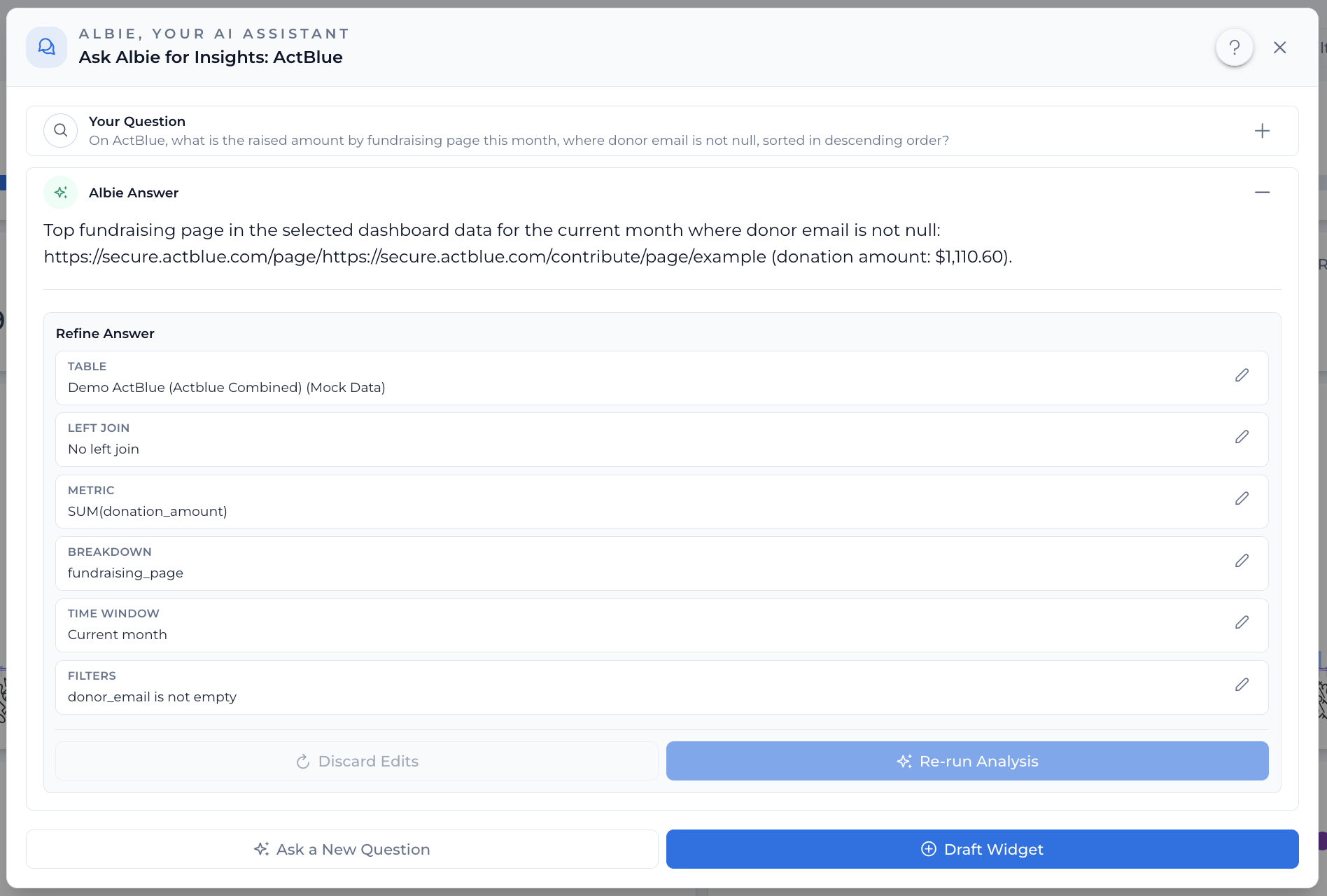
Meet Albie — Your AI-Powered Analysis Partner
Albie is designed to make it as easy as possible to get answers to your most common questions. Simply ask Albie a question about any source on a dashboard (that you are directly permissioned to) and Albie will try to provide you an answer.
Albie is designed to make it as easy as possible to get answers to your organizations data questions, and will always show exactly how it got to the result that it's responding with. In addition, you can easily draft a widget out of the analysis plan so that you never have to ask Albie the same question twice.
Take Control of Your Pipeline Processing Schedules
You can now update and fine-tune pipeline processing controls directly from the settings, giving you full flexibility over when and how your pipelines run. You can adjust pipeline schedule frequency from your organization's Processing settings page.
Managing pipeline schedules previously required workarounds or support requests. With this update, schedule frequency and processing policies can be adjusted on the fly through the UI.
Display Long Text and URLs in Tables
Tables now support long text fields and clickable URLs, so you can preview and access content without leaving the table view.
Filter by "Last X Days" or "Current Cycle"
You can now filter using Last X Days and Current Cycle time range options, giving you more flexible ways to slice your data without manually picking date ranges.
Similarly, we've added "Current Cycle" as a preset dynamic filter option.
Mailchimp Integration Now Available
We're excited to introduce a brand-new Mailchimp connection! 🎉 You can now pull both campaign-level data and get a domain level data to help with evaluating your program's deliverability performance.
Dashboard Reports - Email and Text
📊 You can now subscribe to scheduled dashboard reports and receive reports directly over email or text. Stay informed with daily automated reports — no need to manually check your dashboards.
- Subscribe to dashboard reports via the new Report Subscription dialog
- Automated report generation and delivery on your preferred schedule
New Numero Email Integration
📧 New feature release: You can now connect your Numero Email account as a data source in Optakit! This new integration allows you to ingest and analyze email data from Numero directly within the platform.
- Full Numero Email data ingestion pipeline with support for key email metrics, including opens, clicks, donations, and other exhaust fields
- Global API Key support for streamlined authentication
- dbt models included for automatic data transformation and analysis-ready tables
New Changelog
Follow along here as we publish new updates! You can track new features as we release them. Want to learn more? Reach out to us!