Ubidots
Low-code application development for the Internet of Things
No Incident Left Unanswered: Introducing Escalation Policies
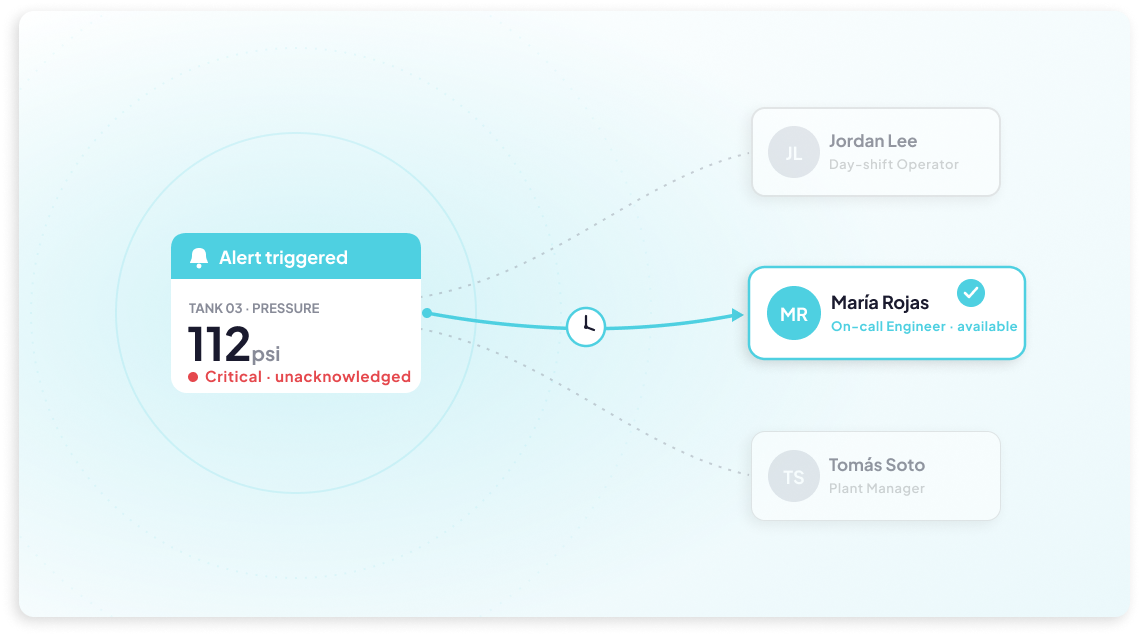
Creating an Incident is only half the battle — making sure the right person actually sees it and acts on it is just as important. That's where Escalation Policies come in. Working hand in hand with the new Incidents module, this feature lets you define a sequence of notification rules that automatically escalate an unacknowledged Incident up the chain, instead of relying on a single alert and hoping for the best. Each rule specifies who gets notified, through which channels — Email, SMS, WhatsApp, or Voice Call — and how many times to retry before moving on to the next set of recipients.
Once a Policy is attached to an Event (or assigned manually when creating an Incident), the escalation runs on its own: if Rule 1's recipients don't acknowledge the issue in time, Rule 2 kicks in, and so on, up to five rules deep. The moment anyone acknowledges the Incident, the escalation stops immediately, no matter which rule is active. Policies are also reusable, so you can build an escalation chain once and apply it across multiple Events. It's a simple way to add real accountability to your alerting workflow — ensuring critical issues are never just a notification that goes unread.
Introducing Incidents: Track Issues From Detection to Resolution
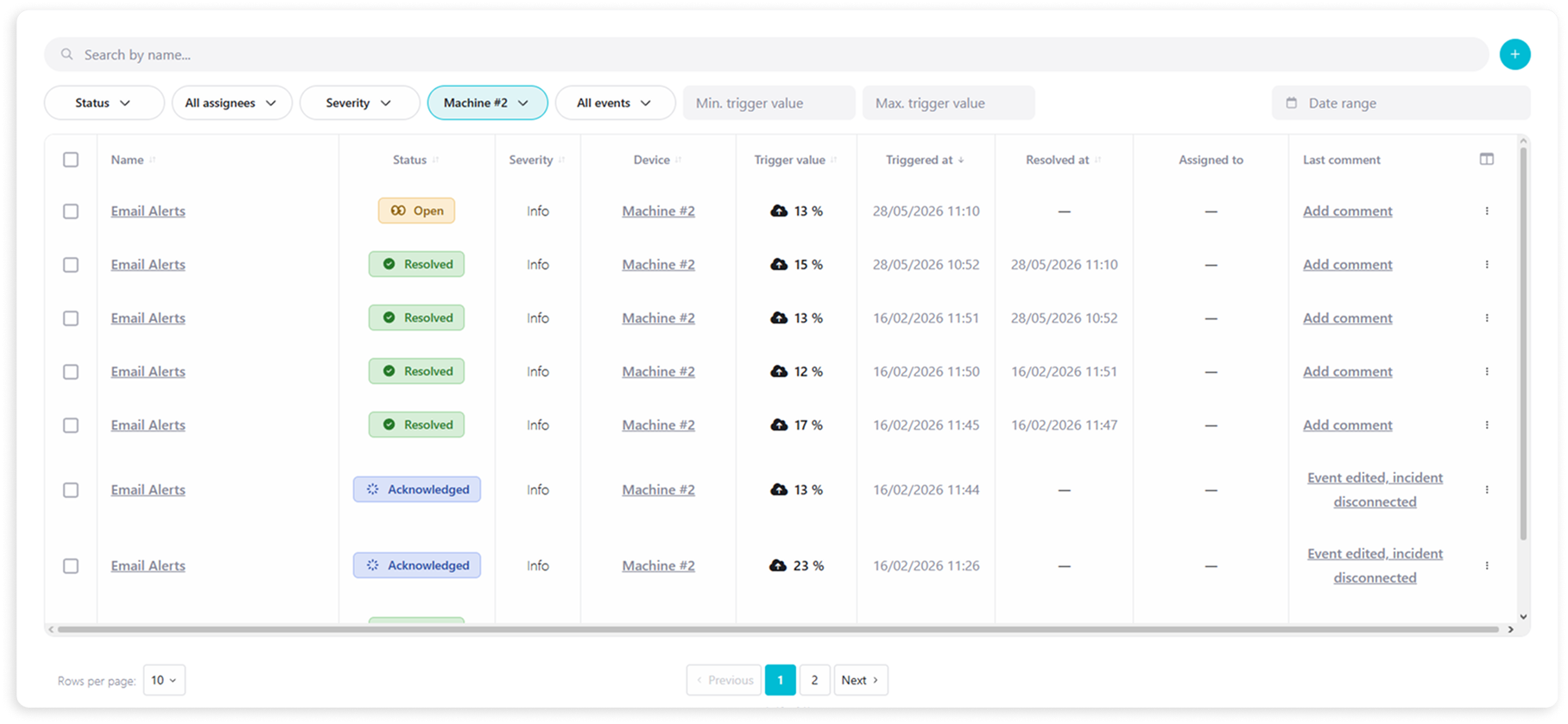
Ubidots Events have always been great at detecting when something goes wrong — but what happens after the alert fires? That's exactly the gap the new Incidents module is designed to fill. Incidents gives your team a structured, shared space to track and manage operational issues from the moment they're detected to the moment they're resolved. Problems can be logged automatically when an Event triggers, or manually by an operator who spots an issue in the field. From there, your team can acknowledge the incident, assign it to the right person, set a severity level, and document every action taken along the way in a timestamped timeline that serves as a permanent audit trail. It's the operational layer that turns your alerts into accountable, traceable workflows — keeping everyone on the same page until the issue is closed.
Smarter Alerts With Context-Based Events
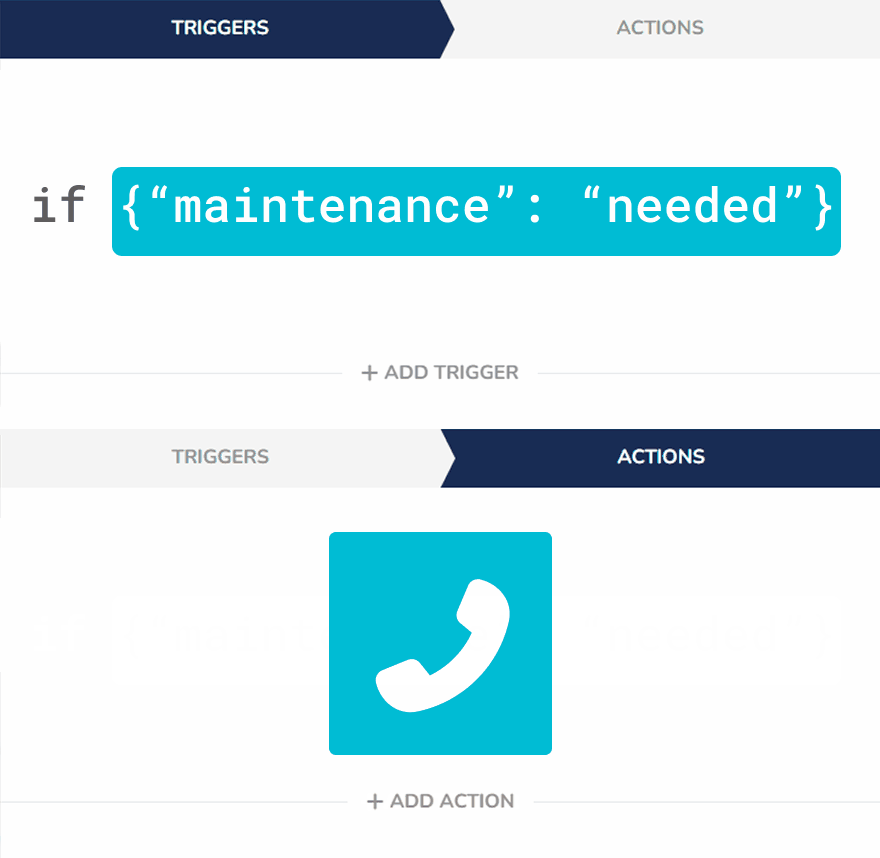
Ubidots events just got even more powerful. In addition to value-based conditions, you can now configure events to trigger based on the context of a variable. This means you can now activate alerts or actions not just when a value changes, but when additional information, like a device's status, meets specific criteria.
Context-based triggers let you build smarter, more targeted automation. Just define the key and condition—such as is, contains, or is not—and let your application respond dynamically to the metadata you’re already sending. It's a flexible way to enhance decision-making without adding complexity to your data model.
Keep Everyone in the Loop With Address Book
Managing who gets notified during key operational events just got easier. With the new Address Book feature, you can now create and manage a list of contacts—people who need to stay informed but don’t require full access to your platform. Whether it’s a field technician, client, or external stakeholder, these contacts can be assigned to events and receive notifications via email, SMS, or voice call, right when they’re needed.
Combined with the Notify User event action, Address Book makes it seamless to target the right people at the right time. Just create contacts and edit them whenever their information changes, instead of modifying events one by one. This reduces friction and ensures consistent communication, helping you keep operations running smoothly without overcomplicating user management.
New Events’ Logs Page
We’ve introduced a new logs page to our Events module that seeks to simplify debugging and the analysis of processes. The page offers an easy-to-understand view of the events’ activity and status.
With it, dissecting operational incidents to understand, for example, who acted upon an alert or who received the notification, becomes an easier task.
New Event’s Action: Notify User
Notifying users about incidents or critical processes at the right time is at the core of an optimally functioning operation. Ubidots simplifies this process with the Notify User event action, which allows you to select users from your account and notify them via SMS, email, voice call, or Telegram using previously saved contact information.
Learn more.
🌩 Trigger Particle downlinks as Ubidots Event actions
Particle Cloud allows devices to expose custom functions through their Cloud so they can be triggered externally using an API call. With a Particle.function line, a specific code on the device can be run when requested from the cloud API.
You typically do this when you want to control something on your device, say a LCD display or a buzzer, or control features in your firmware from the cloud.
Now, together with Ubidots’ Events engine and Particle functions, it is possible to run code on demand based on complex variable’s conditions or in a time weekly basis, in your Devices
See a full example, from Particle device to Ubidots cloud, on how to use this feature here.
🔟 Trigger UbiFunctions from Ubidots Events
Set up and trigger UbiFunctions using Ubidots' Events Engine.
UbiFunctions, Ubidots FaaS (Functions as a Service) module allows users to create their own HTTP API endpoints to perform actions or add functionalities that might fall outside Ubidots built-in features, and need to be tailored to each user application.
As custom user-built endpoints, UbiFunctions can be called via an HTTP webhook to execute any given logic but now, with native UbiFunctions Action in the Events Engine, doing so in a data-driven fashion will be easier than ever with the Event engine.
To learn more about UbiFunctions and actions, check out these articles:
⏱ Scheduled events: Trigger events at a given time
Be it for agritech, building management, or industrial applications, you can now create multiple schedules in a single Event, such as turning OFF an HVAC system on Friday at 6 PM, and then switch it back ON on Monday at 9 AM.
Just hover on the + icon in the Events module, and click on the new scheduled event icon:
Learn more about Scheduled Events here.
📲 Adding a custom To" field to all Event Actions"
Prior to this feature, it was only possible to customize the "To" field in the Voice call event action, so we replicated this to all other actions.
This is useful because it allows use cases like:
- Use device_label dynamically within a Webhook's URL, which is helpful to send downlinks in many platforms, such as Particle Cloud.
- Use a phone number stored in a device property or "context" field, to send a Telegram or SMS.
- Use an email stored in a device property or "context" field, to send an Email.
To learn more about supported custom fields, see this article.
🔔 Repeating Events
If machines could talk, they would probably want to repeat some of their alerts, just to make sure we heard. With the latest changes in our Events Engine, you can trigger repeating actions and notifications (SMS, Emails, Voice calls, Telegrams, etc.) while event conditions are still met.