
Eventtia Changelog
Eventtia first version release notes
⚡Eventtia's MCP is now available in the Claude directory
Our MCP connector, Eventtia Connect, is now published in Claude's connector directory. Once connected, Claude works directly against your account: look up events and summaries, register, confirm or reject attendees, manage attendee types and custom fields, create workshops and sessions, enroll participants, and review check-ins — all in conversation, without leaving Claude.
Why it matters
- Answers instead of exports. "How many confirmed attendees do we have for the Paris edition, and how many seats are left in the morning workshop?" used to mean logging in, filtering, exporting to CSV and counting. Now it's one question.
- Repetitive admin becomes a single instruction. Confirming a batch of pending registrations, enrolling a group in a session, or resending welcome emails no longer means dozens of individual clicks.
- Your data comes to the platform, not the other way around. Claude can read the spreadsheet a sponsor sent you or the list buried in an email thread and register those attendees directly — no reformatting to match an import template.
- Useful on-site, not just at your desk. Seat availability, check-in counts, and attendee lookups are available from your phone, in seconds, while the event is running.
- No integration project required. Connect once from the directory. No developer time, no custom API work, no new tool for your team to learn.
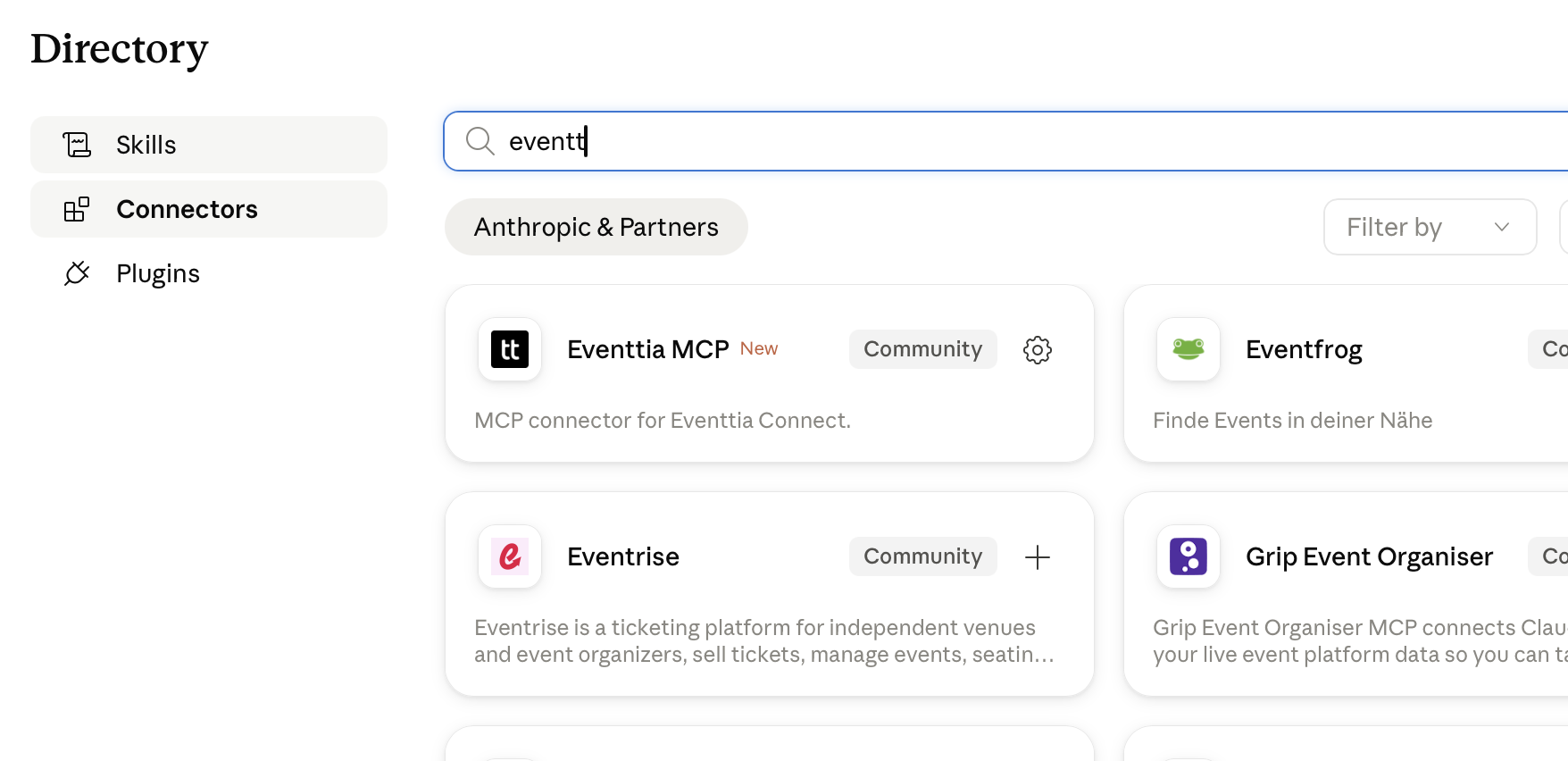
Add it here: www.claude.ai/directory/connectors/eventtia-mcp
🤖New Website & Theme Endpoints in API v4
The public API has been extended with new endpoints to expose event website data and theme configuration, unlocking deeper integrations with the new website builder.
Developers can now retrieve an event's website details and its associated theme through API v4, making it possible to build custom front-ends, embed event branding into external tools, or sync appearance settings with third-party platforms — all without manual configuration.
- Updated websites endpoints in API v4 with an enriched serializer
- New event theme endpoint to fetch appearance and branding data programmatically
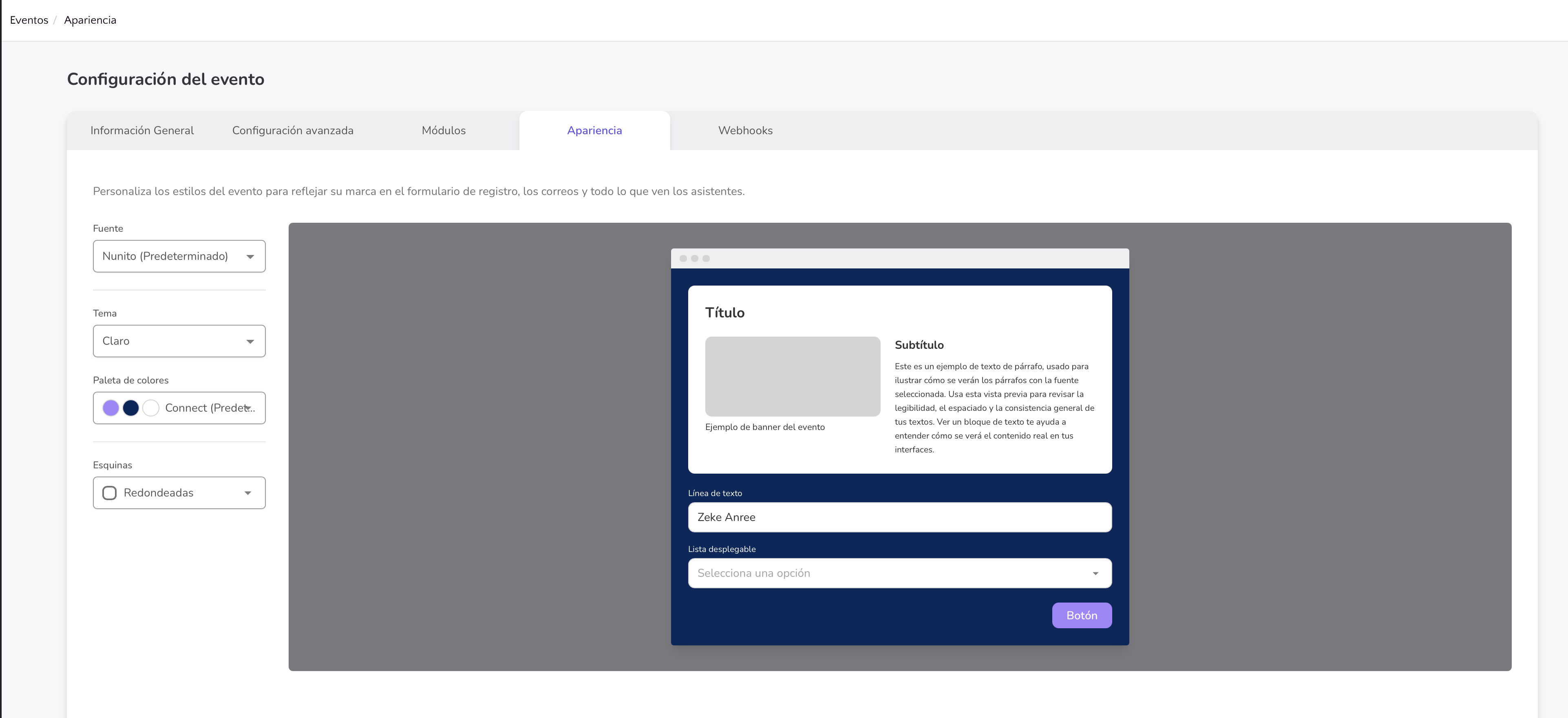
🎨Customize Your Event's Look in One Place
A new Appearance tab is now available in Event Settings, giving organizers a single place to shape the visual identity of their event website.
Instead of juggling scattered style options, you can now define your event's colors, corner styles, and overall theme from one dedicated screen — making it faster to launch an on-brand event experience and easier to keep visuals consistent across every attendee touchpoint.
- New Appearance settings tab for configuring event theme and visual styles
- Corner style selector and refined color controls with smart color math for accessible contrast
- Availability of the Appearance tab is now conditional, so it only appears where relevant
📷 Customize Lead Capture with Your Own Questions
Sponsors and exhibitors can now configure the exact questions they want to ask when capturing leads at your event, turning every scan into a richer, more qualified conversation.
Why it matters: instead of settling for a generic lead form, organizers can tailor the data collected to match each sponsor's qualification criteria, which means better follow-ups, higher ROI for exhibitors, and cleaner data for reporting.
- Create and manage custom lead fields directly from App Settings under the Lead Questions tab
- Support for multiple field types, including dropdown questions with predefined answer options
- Full emoji and multilingual character support in both field labels and captured lead responses
- Lead capture is now scoped to the Leads module, so it only appears where it's actually enabled
- Custom lead data flows through to API v3 responses and Excel exports for seamless downstream use
Available in all supported languages, with a refreshed configuration interface that makes it faster to set up and edit lead questions before your event goes live.
🎨 Brand Your iOS Wallet Passes with a Custom Logo
You can now upload a dedicated iOS logo for your mobile wallet passes, giving your event a polished, on-brand presence right inside attendees' Apple Wallet.
Why it matters: Wallet passes are one of the first touchpoints attendees see on event day. A recognizable logo builds trust, reinforces your brand, and helps your pass stand out among the dozens of cards users may already have saved. Configure it once in your Mobile Passes settings and every issued pass will reflect your identity.
- New iOS icon upload field available in Mobile Passes settings
- Streamlined to a single optimized size, so setup takes seconds
- Applies automatically to all newly generated Apple Wallet passes
Manage Checkpoints Programmatically via API
You can now create, update, and delete checkpoints directly through the Eventtia API in both V3 and V4. This unlocks full automation for check-in workflows, so teams managing large or recurring events no longer need to configure checkpoints manually from the dashboard.
Why it matters: integrating checkpoint management into your existing tools means faster event setup, fewer manual errors, and the ability to sync checkpoints with third-party systems in real time.
- New Create, Update, and Delete endpoints for checkpoints available in API V3 and V4
- Full Swagger/OpenAPI documentation published for both versions to make integration straightforward
https://docs-connect-api-v3.eventtia.com/reference/listcheckpoints
Eventtia Now Speaks Brazilian Portuguese
Attendee and form experiences are now fully available in Brazilian Portuguese (pt-BR), making it easier to run events for Brazilian audiences without language barriers.
Why it matters: Local-language experiences dramatically improve registration completion rates and attendee engagement. Event organizers targeting Brazil can now deliver a native experience out of the box, without needing custom translations or workarounds.
- Attendee details and profile fields translated to Brazilian Portuguese
- Form labels and inputs available in pt-BR
- Automatic locale detection ensures Brazilian attendees see the right language from the start
Track Coupon Usage Directly in Payment Reports
Payment reports now include coupon information alongside every transaction, giving organizers a complete view of how discounts impact their event revenue without needing to cross-reference multiple exports.
Why it matters: Reconciling coupon campaigns used to mean stitching data together from separate sources. Now, you can see which coupons were applied, their value, and their effect on payments — all in one place — making financial reporting and campaign ROI analysis significantly faster.
- New coupon columns added to the attendee payments report and Excel exports
- Redesigned payment type presentation for improved readability
- Coupon details are consistently displayed across in-app views and downloadable reports
🎈Get Your Events Discovered on Google Events
Your public events can now appear directly in Google Search and Google Events results, giving you a whole new channel for driving attendee traffic without any extra marketing effort.
Eventtia now automatically generates and uploads a Google Events feed for all your indexable events. This means richer, more visible listings on Google — with correct dates, locations, ticket details, and localized information — helping potential attendees find and register for your events faster.
- Automatic feed generation and scheduled upload for all events with search engine indexation enabled
- Localized event information using standard BCP47 language tags for proper regional targeting
- Complete event metadata included: ticket prices, event URLs, dates, and venue details
- Only public, indexable events are included — private events remain private
Why it matters: more organic discoverability on Google means more eyes on your events, more registrations, and less spend on paid acquisition channels.
💳 Pay with Afterpay in Australia
Attendees registering for events in Australia can now complete their payments using Afterpay, giving them the flexibility to split purchases into installments at checkout.
Why it matters: Offering Afterpay as a payment option reduces friction for Australian buyers, increases conversion on higher-priced tickets, and meets a payment method many attendees already expect to see.
- Afterpay is automatically available when the event country is Australia and the currency is AUD
- Billing address form has been hardened with per-field validation, AU postcode rules, and numeric-only input where appropriate
- Group registrations now capture first name and last name to satisfy Afterpay's payer information requirements
Track Attendee Check-Ins Through the API
New API endpoints let you retrieve attendee check-in data for events, sessions, and checkpoints directly from your integrations. Whether you're building custom dashboards, syncing attendance with a CRM, or powering on-site reporting, you can now pull check-in records programmatically without manual exports.
What's included in this release:
- New check-in endpoints available in both API v3 and v4 for attendee event check-ins, workshop check-ins, and checkpoint check-ins
- Admin views for sessions and workshops now return complete data, fixing visibility issues for users with admin permissions
- Improved consistency in attendee presence naming across workshop check-in responses for cleaner downstream processing
Why it matters: Real-time attendance data is now accessible at every level of your event, eliminating the gap between on-site check-in activity and the systems your team relies on for reporting, follow-up, and post-event analytics.
https://docs-connect-api-v3.eventtia.com/reference/getattendeeeventcheckin
https://docs-connect-api-v3.eventtia.com/reference/listattendeecheckpointcheckins
https://docs-connect-api-v3.eventtia.com/reference/listattendeeworkshopcheckins
Apple Pay Now Available Through Adyen
Apple Pay is now supported as a payment method when processing transactions through Adyen, with the required domain association certificate registered on the platform.
Why it matters: Attendees can complete registrations and ticket purchases with a single tap on their Apple devices, reducing checkout friction and boosting conversion rates for paid events.
🎨 Redesigned Meetings Overview Report with Excel Export
The Meetings Overview report has been completely redesigned, giving organizers a cleaner, faster way to analyze networking activity at their events. The new interface makes it easier to filter, review, and share meeting data with stakeholders.
Why it matters: networking is often the most valuable part of a business conference, and reporting on it shouldn't slow you down. The reskinned view loads faster thanks to optimized queries, and the new Excel export means you can hand over a polished summary to sponsors, partners, or internal teams in seconds — no manual data wrangling required.
- Refreshed Meetings Overview interface with improved filters for quicker analysis
- New Excel export tailored to meeting summary data
- Optimized backend queries for faster report loading
- Full localization support across all available languages
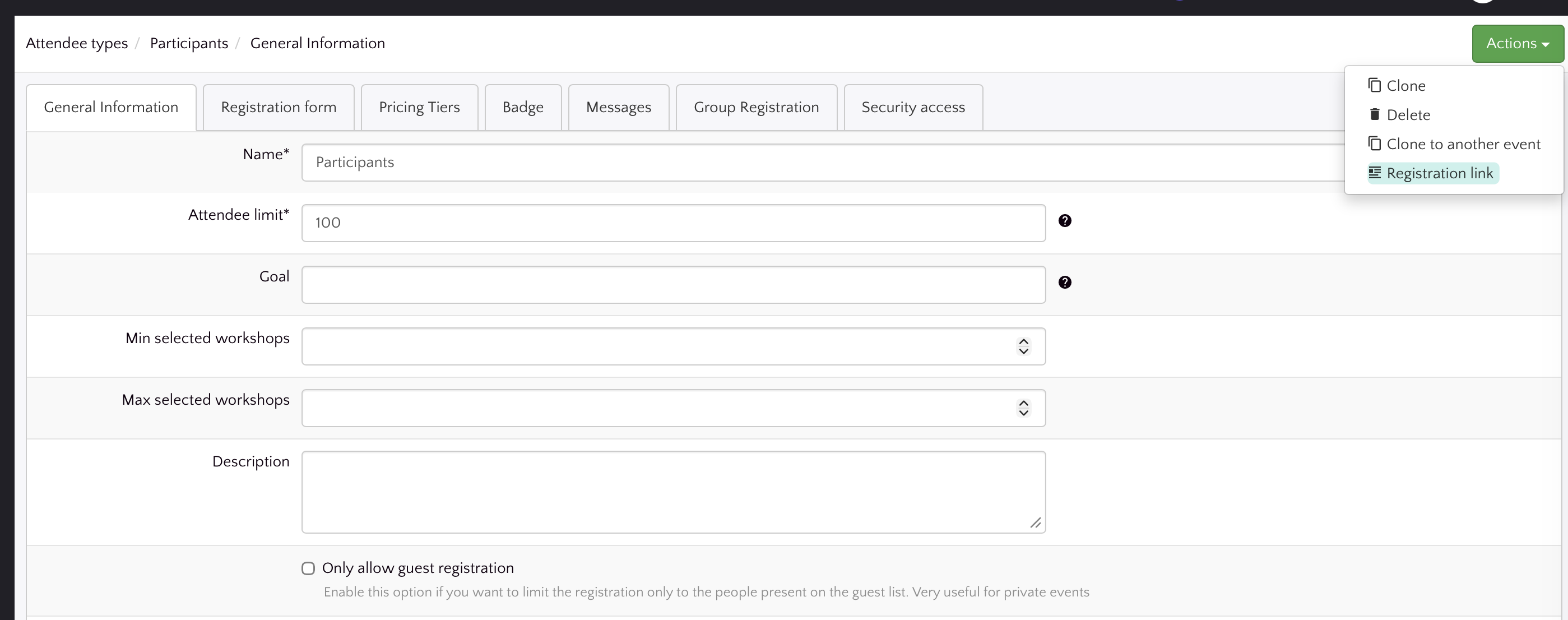
Grab Public Registration Links in One Click
You can now copy the public registration link for any attendee type directly from the attendee types list, no more digging through settings to find the right URL.
Why it matters: sharing registration forms with your audience is one of the most common tasks when launching an event. This shortcut saves you time, removes friction, and helps your team distribute the right link faster, whether you're sending it to a partner, posting it on social media, or embedding it in a campaign.
- New quick-access button to copy the public registration link from the attendee types index
- Localized labels and tooltips available across all supported languages
- Smarter visibility rules so the button only appears when a public link is actually available
Run Your Events in Brazilian Portuguese
Eventtia now speaks Brazilian Portuguese (pt-BR), giving organizers and attendees in Brazil a fully localized experience across the platform.
This means you can deliver events in your audience's native language without manual workarounds, helping you boost engagement, reduce confusion, and grow your reach in one of the world's largest event markets.
- Complete pt-BR translations across the platform, including attendee, event, payment, coupon, and registration flows
- Brazilian Portuguese is now selectable as a language option for events and attendee types
- Localized labels for forms, emails, error screens, and the API layer so every touchpoint feels native to your Brazilian audience
Filter Attendees by Payment Status via API
You can now filter attendees by their payment status directly through the API, making it easier to segment paid and unpaid registrations without manual sorting.
This update saves time for teams managing large events and integrations, allowing finance, marketing, and operations workflows to pull exactly the attendee data they need in a single request.
For more information: https://docs-connect-api-v3.eventtia.com/reference/listattendees
Coupon Codes Now Available in API v3
You can now access coupon code data directly through API v3, including the coupon code information associated with each attendee. This makes it easier to track promotional usage, reconcile discounts, and build reporting workflows without juggling multiple data sources.
What's included in this release:
- New API v3 endpoints for retrieving coupon codes
- Attendee responses now include the associated coupon code, so you can see at a glance which discount each registrant used
- Full Swagger documentation and schemas for coupon codes, making integration faster for your developers
Why it matters: teams running discount campaigns can now pull attendance and coupon usage data in a single API call, saving time on reporting and giving marketers a clearer view of which promotions actually drive registrations.
Manage Attendee Type Custom Fields via the API
You can now create, read, update, and delete custom fields for attendee types directly through the Eventtia API (v4) — giving you full programmatic control over how registration forms are configured per attendee type.
🎯 Why it matters: If you manage events with multiple attendee types (e.g., speakers, sponsors, general attendees), you often need different registration fields for each. Until now, configuring those custom fields required manual work inside the platform. With these new endpoints, you can automate the entire setup — saving time during event creation, enabling bulk configuration across events, and unlocking tighter integrations with your own systems.
- New CRUD endpoints for attendee type custom fields under API v4
- Full serialization support so custom field data is returned in a clean, structured format
- Improved error messages for clearer feedback when API requests fail
- Multi-language support for attendee type error messages across all supported locales
Whether you're building a custom registration flow or syncing field configurations from an external tool, these endpoints make attendee type customization a first-class part of the API.
🖲️ Track Attendees & Guests with a New Internal ID Field
You can now assign an Internal ID to both attendees and guests, giving you a dedicated field to map your own organization's identifiers directly within Eventtia — no more repurposing custom fields or juggling spreadsheets.
🎯 Why it matters: If your team already tracks people by employee number, membership ID, or CRM identifier, this new field lets you carry that context into Eventtia so you can search, filter, and reconcile records without switching tools.
Here's everything included in this release:
- Internal ID for Attendees — A new built-in field is now available on attendee profiles and can be configured per attendee type through custom field settings.
- Internal ID for Guests — The same field is available on guest records, keeping your data consistent across both attendees and their guests.
- Filtering support — You can filter attendees and guests by Internal ID, making it fast to locate specific records in large participant lists.
- Excel export included — The Internal ID is now part of attendee and guest Excel exports so your offline reports stay complete.
- Communication tags — Use the Internal ID as a dynamic tag in emails and communications to personalize messages with each recipient's identifier.
- Full multi-language support — The field label is translated across all supported languages including English, Spanish, German, French, Arabic, Catalan, and more.
The Internal ID field is available immediately on all events. You can start populating it manually, via import, or through the API (v3) for guests.
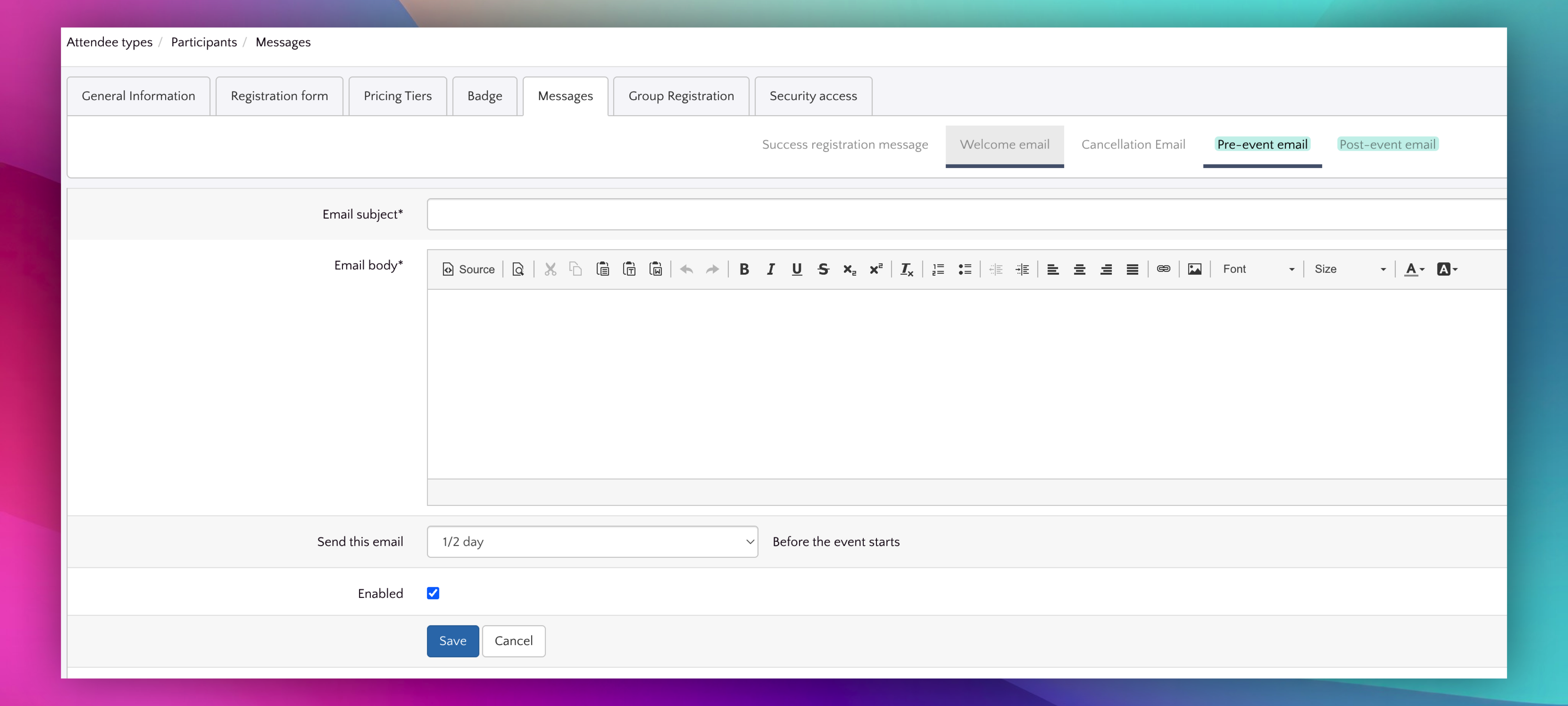
📅Automate Pre-Event and Post-Event Email Reminders
You can now schedule automated email notifications to be sent before and after your event — keeping attendees informed and engaged without any manual effort on your part.
Whether it's a reminder the day before your event starts or a thank-you message after it ends, pre- and post-event emails help boost attendance rates and maintain engagement. No more last-minute scrambling to send communications — set them up once and let the platform handle the rest. ✉️
- Configure pre-event and post-event notification emails directly from the event settings, with a dedicated form for each notification type.
- Schedule reminders at specific intervals relative to your event date so communications land at exactly the right moment.
- Use dynamic tags in email subjects and bodies to personalize messages with attendee and event details automatically.
- Notifications are configured per attendee type, giving you full control over which audience segments receive which messages.
This means less time spent on repetitive communication tasks and more consistent, professional outreach to every attendee — ultimately helping you drive higher attendance and better post-event follow-through.
Session Webhooks for Real-Time Integrations
Eventtia now fires webhooks for session-related events, allowing your external systems to stay in sync whenever sessions are created, updated, or modified. 🔗
If you rely on third-party tools for scheduling, notifications, or analytics, session webhooks eliminate the need for manual data syncing — your integrations update automatically in real time.
- New webhook payloads include detailed session data via a dedicated session serializer
- Webhook sync status tracking on sessions so you always know the delivery state
- Workshop definition serializer updates ensure complete and accurate data in webhook payloads
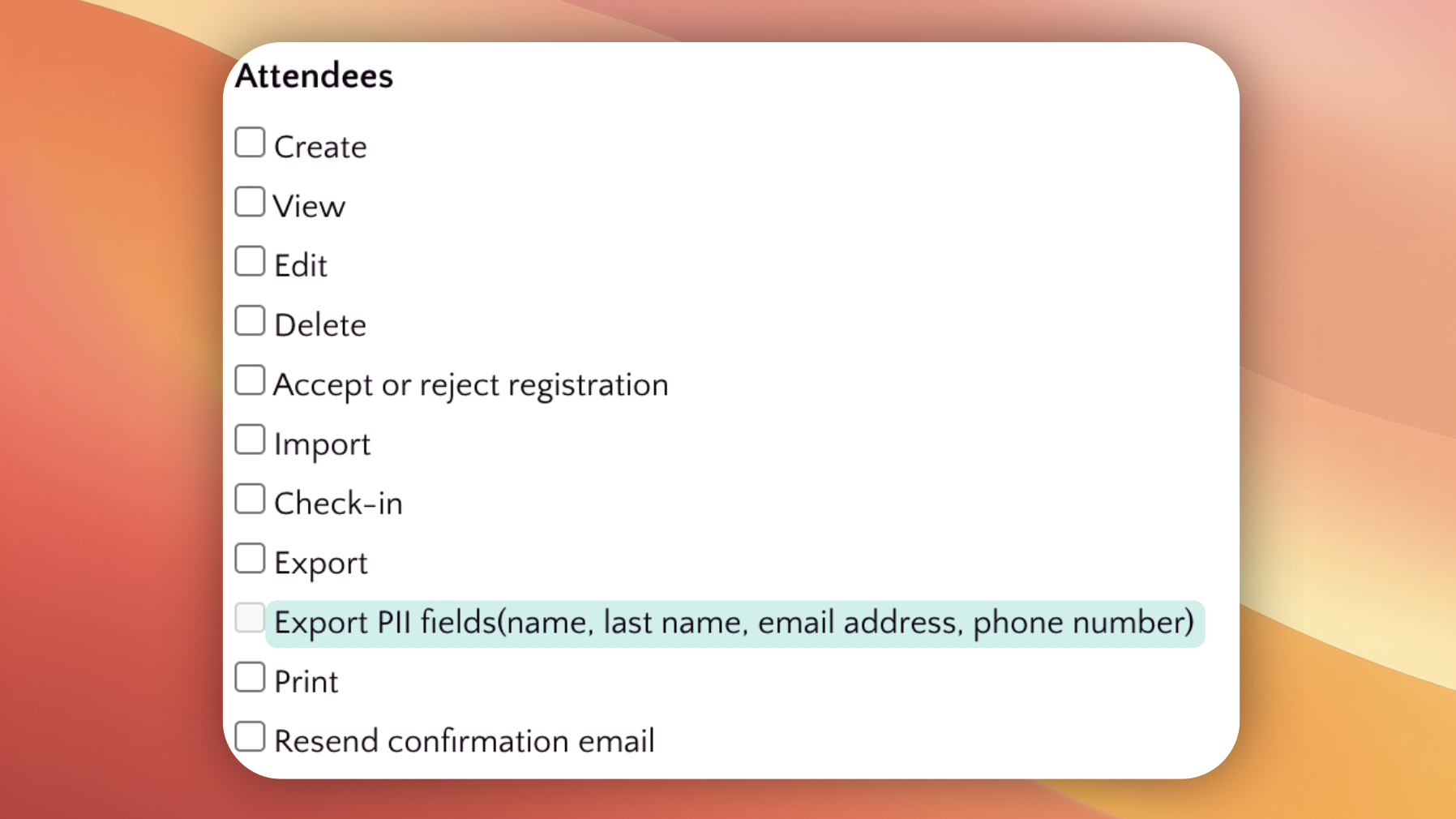
Control who can export personally identifiable information (PII)
A new Export PII permission is now available in the roles and permissions settings, giving you granular control over who can export sensitive attendee data. This ensures that personally identifiable information — such as names, emails, and other personal details — can only be exported by authorized team members. 🔒
This permission applies across all major export areas, so your data governance policies are consistently enforced:
- Attendee list exports
- Attendee field exports
- Registration reports
- Activity checkpoint exports
- Attendee event trace exports
- Attendee workshop exports
- Meeting exports
Existing roles that already have export rights have been automatically granted this new permission, so there's no disruption to your current workflows. You can revoke or adjust access at any time from the permissions settings.
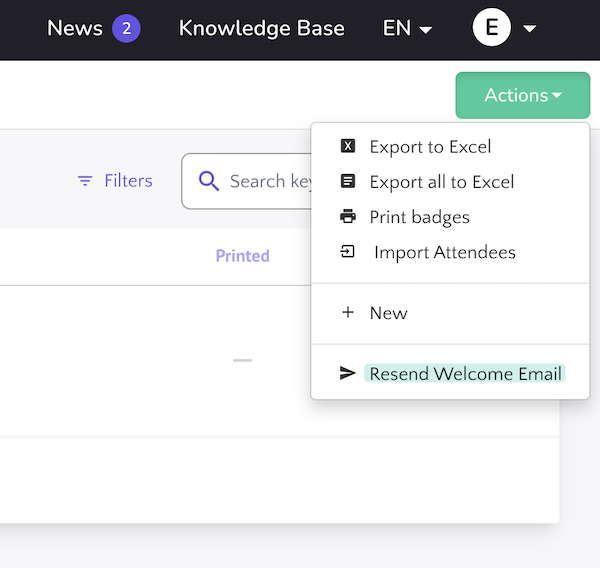
Batch Resend Welcome Emails to Attendees
You can now resend welcome emails to multiple attendees at once! 🎉 Instead of sending welcome emails one by one, event organizers can select a batch of attendees and trigger a mass resend directly from the attendees list.
This feature includes a real-time progress modal so you can track the status of the email delivery as it happens, giving you full visibility into the process.
- Select multiple attendees and resend welcome emails in bulk
- Real-time progress bar tracks email sending status
- Available in English, Spanish, and German localizations
Google Maps Address Validation for Events
We've added Google Maps autocomplete address validation when creating or editing events. 📍 This ensures that event locations are accurate and standardized, making it easier for attendees to find your venues.
- Event location fields now leverage Google Maps autocomplete to suggest valid addresses as you type
- Address validation helps prevent typos and incomplete location information
- Multi-language support included — translations updated across all supported languages
Remove attendees from workshop sessions directly from the list
You can now remove attendees directly from the workshop session attendees list! 🎉 This new feature streamlines workshop management by allowing organizers to quickly unassign participants without navigating away from the attendees view.
Previously, managing attendee assignments for workshop sessions required additional steps. With this update, a remove action is available right within the attendees list, making it faster and more intuitive to manage your workshop rosters.
- New remove button available on each attendee entry in the workshop session attendees list
- Multi-language support included — the feature is available across all supported languages
New date picker for custom fields
📅 Custom fields now feature a brand-new date picker component, providing a more intuitive and visually appealing way to select dates during registration and attendee forms.
- Modern date picker integrated into custom field forms for a smoother date selection experience
- Smart positioning ensures the date picker displays correctly regardless of where the field appears on the page
- Consistent date picker behavior across both registration and attendee custom field forms
Activity Checkpoint Report
📊 A brand-new Activity Checkpoint Report is now available in the Registration Reports section, giving you full visibility into attendee check-in movements across your event's program activities and checkpoints.
This report allows event organizers to track and analyze how attendees flow through different activities and checkpoints, making it easier to understand attendance patterns and optimize your event logistics.
- View detailed check-in movement data for all program activities and checkpoints in one place
- Filter results by date range to focus on specific time periods during your event
- Export the full report to Excel for offline analysis, sharing with your team, or archiving
- Real-time progress tracking during Excel export so you always know the status of your download
- Paginated results for easy navigation through large datasets
Navigate to the Reports → Registration Reports section to access the new Activity Checkpoint Report and start gaining deeper insights into your event's attendee engagement.
Filter Events by Custom Fields
You can now filter your events using custom fields! 🎉 This powerful new feature makes it easier than ever to find exactly the events you're looking for, especially when managing a large number of events with specific attributes.
The new event filters panel lets you narrow down your event list based on the custom fields you've configured, helping you quickly locate and manage events without endless scrolling.
Payments API Endpoint
A new Payments API endpoint is now available in the v4 API, enabling you to programmatically access and manage payment data for your events. 💳
- New GET payments endpoint added to the API v4, allowing external integrations to retrieve payment information
- Includes a dedicated payment serializer for consistent and structured API responses
API Documentation here: https://docs.eventtia.com/#payments-v4
🔗 Webhook Support for Sessions
Great news for integrations! We've added webhook support for session creation and updates. You'll now receive real-time notifications including space availability data whenever sessions change.
Perfect for keeping your external systems in sync with your event schedule!
https://docs.eventtia.com/#creating-a-event-web-hook
New Event Type: Appointment Booking 📅
We're excited to introduce a new way to manage your events! You can now configure your event as an Appointment Booking type, perfect for workshops, one-on-one sessions, and scheduled appointments.
When your event is set to Appointment Booking mode, all participant communications automatically use the workshop date instead of the main event date. This means:
- ✉️ Confirmation emails with calendar files (.ics) show the correct workshop time.
- 📱 WhatsApp tickets display when the attendee's session actually starts.
- 💳 Digital wallet passes (Apple Wallet & Google Wallet) reflect the workshop schedule.
- 🔗 Webhook integrations send the workshop start date for seamless third-party synchronization.
Smart fallback logic: If an attendee hasn't selected a workshop yet, or has registered for multiple workshops, the system gracefully uses the main event date.
This feature streamlines the experience for events where participants book specific time slots, ensuring everyone knows exactly when and where to be! 🎯
🎯 New: "Show Only in Public Areas" Now Available Per Session!
More control over your workshop visibility! In the Slots feature, you can now mark individual sessions as "Show Only in Public Areas."
Previously, this setting was only available at a global level. Now you have the flexibility to configure it on a per-session basis—perfect for when you need some sessions visible to everyone while keeping others more exclusive. 🔐
Granular control, your way!
📥 New: Import Hundreds or Thousands of Sessions at Once!
Big news for large-scale event organizers! We've supercharged the Workshops module with a powerful new import feature.
You can now import hundreds—or even thousands—of sessions in one go. Whether you're managing a multi-day conference, a massive festival, or an event with dozens of tracks, setting up your agenda just got a whole lot faster. ⚡
No more manual entry, no more tedious copy-pasting. Just upload your data and let the platform do the heavy lifting. 💪
Save time, scale effortlessly!
🛡️ New Feature: Two-Factor Authentication is Here!
Your account security just got a major upgrade! We're excited to announce that Two-Factor Authentication (2FA) is now available for all user accounts. 🎉
With 2FA enabled, you'll add an extra layer of protection to your account beyond just your password. Even if someone gets hold of your credentials, they won't be able to access your account without the second verification step.
How to set it up: Head to your Account Settings → Security, and follow the simple steps to enable 2FA. You can use your favorite authenticator app to generate secure codes.
Protecting your event data, client information, and hard work matters to us—and now you have even more control over your account security. 💪
Questions? Our support team is ready to help you get set up!
Stay secure, keep creating! ✨
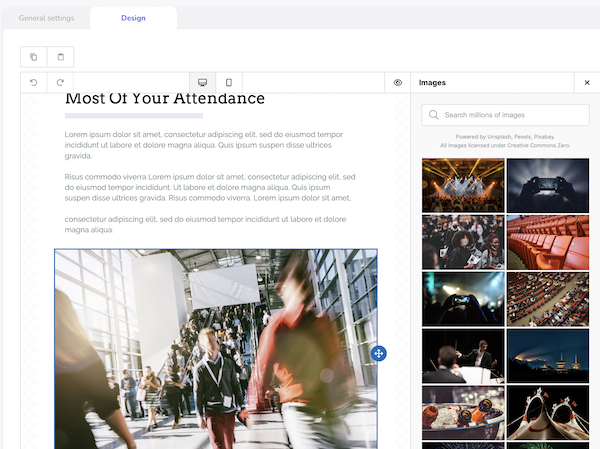
Unlock Stunning Emails with Stock Photos! 🖼️✨
We’re excited to introduce a brand-new stock photo library right inside the massive messages editor!
Now you can easily browse and insert high-quality images into your emails, making your event communications richer, more vibrant, and unforgettable. Say goodbye to plain text—your attendees will love the visual flair! 🎉
🇬🇧 New Custom Field: Country Only 🌍📝
Need to keep your registration forms simple? We’ve added a new custom field type: Country!
It lets you ask for the participant’s country only—no need for state, region, or city.
Perfect for quick forms where you just need to know where your attendees are from! 🌎✨
📱 New Feature: SMS Notifications for Your Guests! 🎉
Exciting news! You can now send SMS messages directly to your event guests right from our platform. Keep your guests informed with instant updates, reminders, and important announcements via text message. This new communication channel will help ensure no one misses out on your amazing events! 🌟
Exciting Update: A new Mass Email Editor is here 📩
We’re thrilled to introduce Eventtia's brand-new Mass Email Editor.
A game-changer solution for creating professional, engaging, and fully customizable emails! ?
Unlike traditional editors, Eventtia's solution provides
✅ Drag-and-drop simplicity – Build emails effortlessly, no coding required
✅ Full-design control – Customize structure, colors, and branding with ease
✅ Mobile & email client optimization – Ensure perfect rendering across all devices
✅ Advanced personalization – Make your emails more dynamic and impactful
This upgrade means better communication, stronger engagement, and smoother workflows—all in just a few clicks! ✨
Try it now and elevate your email game! ??
New Feature: Mobile Passes for event attendees
We’re excited to announce a new way to enhance your attendees’ experience—you can now send mobile passes directly to their phones 💳.
Attendees can now receive and store their event passes on:
✅ Apple Wallet (iOS).
✅ Google Wallet (Android).
This makes event check-ins smoother, faster, and more convenient—no need to print or search for emails! Just tap, scan, and go!
Start sending mobile passes today and simplify the attendee experience! ?✨
Send registration confirmations and tickets to attendees directly through WhatsApp
Eventtia enables you to automatically send entry tickets and registration confirmations directly via WhatsApp, ensuring a seamless experience and providing attendees with quick, easy access to your event.
To enable and try this feature, click here to learn more.
API: Access Your M2M Credentials for a More Secure and Efficient Connection
We are pleased to inform you that Eventtia now provides a client ID and a secret key for those who need to connect to our API.
This process can be viewed from the back office, in the "My Account" section, under the "M2M Credentials" tab.
For more details on how to use these credentials, you can consult the article in our Knowledge Base, as well as access our API documentation at the following link: Eventtia API Documentation.
Take a step today and experience how a well-executed integration can transform your connection process.
If you have any additional questions, the Eventtia support team is here to assist you.
New Global Dashboard for 1:1 Meetings
We are excited to announce the implementation of a new global dashboard in Eventtia's 'Networking module'.
This synchronized global panel is designed to present the status of 1:1 meetings, helping you quickly identify available time slots. ?️
For easy identification, available slots appear in green, and unavailable ones in red.
Additionally, you can manage filters by name, participant type, and date, further simplifying the organization of your events. ?
This feature is located in the section: Business Meetings > Global Dashboard.
Moreover, the admin user has the ability to book 1:1 meetings for any attendee, directly from this new panel.
⚡️ We hope this new feature makes your events even more efficient and successful.
New Feature for In-Person Events: Your Attendees Can Take Notes During Meetings
At Eventtia, we are excited to share a new update for your in-person events.
A new ‘Notes module' for on-site meetings is now available.
What does this mean for your attendees?
Your participants can now take and save notes directly from the participant’s card with whom they have an appointment.
Additionally, they can view and trace each note from the program using the agenda print icon. ?️
⚡️ We hope your attendees enjoy this new feature.
Guest Communications: New Tag to Add a Cancellation Button
We are pleased to announce a new enhancement in our communications module: You can now include a cancellation button in the messages you send to your guests.
Previously, it was only possible to add a link, but with this new tag, the process is more intuitive and convenient.
✨ How to use this new feature
It's very simple: when configuring your mass message for guests, you will find the cancellation button tag at the end of the page in the section: Modules > Resgistration > Communications > Mass Emails > Guest Recipient > Cancellation Button Tag.
? Benefits of this enhancement
Greater flexibility: Your guests will have an easier way to cancel their attendance.
Better organization: Simplifies event management by providing a clear and direct cancellation option.
Don't miss the opportunity to enhance your event experience with this new feature.
On-Site mobile app: Filter attendees, easily and quickly
You now can find your participants quickly and easily, organized alphabetically for smoother navigation.
Plus, you're now able to see the newest participants in the blink of an eye.
? This enhancement not only simplifies the management of your events but also significantly improves the experience of your stakeholders.
Download the latest version of the On-Site app (iOS - Android) and take your events to the next level.
On-Site Mobile App: Now See Which Team Member Registered Each Attendee
In Eventtia's On-Site mobile app: You can see the name of the administrator who registered each participant.
This feature provides you with greater transparency and visibility into who is managing the registration of your attendees.
You can find this information within the profile of each participant in the activity lists, checkpoints, and attendee sections. This feature allows you to better track and understand your events.
Thank you for being part of our community.
e
Discover the Innovative Eventtia On-Site Mobile App: Simplifying Attendee Management for In-Person Events
Imagine the freedom of being able to register new participants at the last minute, at the door of your event venue.
Introducing Eventtia On-Site - Simplify access control and register last-minute participants at events without the need for a web platform.
Eventtia On-Site is much more than just an access control application. It is a comprehensive solution that transforms the way you interact with your attendees in real time.
What makes it so special? Let us explain.
With Eventtia On-Site, you no longer have to rely a web platform to manage last-minute registrations or control participant access.
This intuitive and easy-to-use mobile application (iOS and Android) allows you to perform all these functions directly from a mobile device.
Click here to learn more in our Knowledge Base
Inclusion of TWD (Taiwan) currency
We are expanding our currency options to include Taiwan.
Now available in our event general settings module is the Taiwanese Dollar (TWD), allowing you to charge attendees in Taiwan's official currency.
New Functionality for Event Organizers: Uploading JS and CSS at the Account Level
Users can now upload their own JS and CSS in a dedicated space at the account level.
This makes it easy to apply specific styles and functionalities to all events, eliminating the need to add them individually.
However, if a custom design is required for a particular event, it can still be managed from the advanced registration settings.
This feature is available in the administration area / Back office under My Account > Event Defaults > Select CSS file and/or Select JS file.
We hope this new functionality enhances your experience and helps you customize your events more efficiently.
Thank you for being part of our community.
New Profile Viewing Indicator in the Attendees List
We are pleased to announce a new feature that enhances the attendee experience at your in-person, virtual and hybrid events.
With this latest development, users now have the ability to easily identify whether they have already viewed a participant's profile in the participants module.
Once a profile has been viewed, the circle around the participant’s photo disappears, thus facilitating tracking of interactions.