
Eventtia Changelog
Eventtia first version release notes
🔒Password Gate Now Fully Resets Website Sessions
Enabling the password gate on your event website now automatically clears any active visitor session cookies, ensuring the protection takes effect immediately for everyone.
Why it matters: Previously, visitors who had already accessed your site could bypass a newly enabled password gate thanks to their existing session. This fix closes that gap, giving organizers confidence that turning on password protection instantly secures the site for all users — no manual cache clearing or waiting required.
🐞More Reliable Attendee Leads Data
We've resolved an issue affecting the attendee leads API response, ensuring your team gets accurate and complete lead information every time.
This fix means fewer surprises when pulling lead data through integrations or exports — helping sales and event staff follow up on the right contacts without missing a beat.
🐞Your Language Preference Now Sticks Across Sessions
The platform now remembers your preferred language through a dedicated cookie, so you no longer need to reset it every time you log in or switch pages.
Why it matters: Multilingual teams and international users save time and avoid friction by having their chosen language persist reliably across the entire platform. Combined with a new language switcher directly in the navbar, changing languages is now a one-click action that stays applied wherever you go.
- New cookie-based language preference that persists across sessions
- Added a language switcher directly in the private navbar for quick access
- Hardened cookie handling with additional security safeguards
Accurate Ticket Pricing in Google Events Feed
Events with all-free tickets now display correctly in the Google Events feed, ensuring your events appear with the right pricing information across Google's discovery surfaces.
Why it matters: Incorrect ticket price structures could prevent your free events from being properly indexed or displayed on Google, reducing visibility and attendance. This fix ensures accurate representation so potential attendees see the right information the first time.
⚡ Accurate Timezones on the Attendees List
Dates and times on the attendees list now display correctly according to your event's timezone, so you always see the right information at a glance.
This fix eliminates confusion caused by mismatched timestamps, helping organizers make quicker, more reliable decisions when reviewing attendee activity across different regions.
🐞More Reliable Post-Workshop Notifications
We fixed a validation issue that could prevent notifications scheduled for after a workshop from being set up correctly.
This means organizers can now confidently schedule follow-up communications tied to workshop timing, without running into unexpected validation errors that delay attendee outreach.
🐞 Accurate Day Filtering in Workshop Schedules
Filtering workshop sessions by day now returns the correct results, so attendees see exactly what's happening on the date they've selected.
This fix removes a source of confusion during event browsing and registration — no more missing sessions or unexpected entries when navigating multi-day workshop agendas. Attendees can plan their schedule with confidence, and organizers spend less time answering questions about session availability.
🐞 More Reliable PayU Payment Confirmations
We've resolved an issue with the PayU webhook that could cause payment confirmations to be processed incorrectly.
Why it matters: attendees and organizers can now trust that PayU transactions are properly recorded in Eventtia without manual reconciliation, reducing support overhead and ensuring accurate payment tracking across your events.
🐞 More Reliable File Extension Handling
Fixed an issue where certain file extensions weren't being recognized correctly during upload, causing valid files to be rejected.
Why it matters: this ensures the file types you rely on every day — from PDFs to images to spreadsheets — are accepted consistently, removing a small but annoying source of friction when preparing event materials.
⏱️ More Accurate Attendee Registration Cutoffs
Registration limits based on date and time now respect the exact moment you specify, down to the hour and minute, instead of rounding to the day.
Why it matters: If you set a registration deadline for a specific time, attendees will no longer slip through after that exact cutoff. This gives organizers precise control over when registration windows open and close, preventing last-minute sign-ups that exceed your planned capacity or schedule.
🐞 Smoother Sponsor Category Deletion
Deleting sponsor categories now works reliably, with clearer feedback and proper handling of associated sponsors.
Why it matters: cleaning up unused categories used to cause confusion when sponsors were still attached. The flow is now predictable, so organizers can keep their sponsor structure tidy without unexpected errors.
Protect Group Registrations from Accidental Deletion
Attendees registered through a coupon that allows multiple attendees can no longer be deleted individually, preventing broken group registrations and orphaned records.
Why it matters: Deleting a single attendee from a multi-attendee coupon could leave the registration in an inconsistent state, causing confusion for organizers and billing discrepancies. This safeguard ensures group registrations stay intact and accurate.
🐞Custom Fields Now Properly Save 'Admin-Only' Toggle When Disabled
Disabling the 'edit admin only' restriction on attendee custom fields now saves correctly. Previously, switching this setting to false was silently ignored, leaving the field locked to admin-only edits despite the change.
Why it matters: Event organizers can now reliably open custom fields for attendee editing without having to work around a setting that wouldn't stick — fewer support tickets, less confusion, and accurate form permissions from the first save.
More Reliable Asset Delivery Across Events
Event assets now load consistently through the updated CDN routing, ensuring images and files appear reliably for every attendee.
Why it matters: This fix prevents broken asset links and missing media on event pages, reducing support tickets and ensuring a polished experience for your attendees from the moment they land on your event.
More Reliable Cancellation and Event Reminder Emails
Cancellation emails and pre/post-event notifications now reach the right attendees at the right time, closing gaps where some messages were missed or sent incorrectly.
Why it matters: attendee communications are critical touchpoints around your event. This fix ensures cancellations are properly acknowledged and reminders land as expected, reducing confusion and follow-up support requests for your team.
- Corrected cancellation email delivery logic
- Fixed pre-event and post-event reminder scheduling
- Refined attendee filtering for private communications
✅ Workshop Available Days Now Display Correctly
We've fixed an issue where workshop available days were not being calculated or displayed correctly, both on the public-facing workshop pages and through the API.
This ensures that attendees now see accurate availability when browsing workshops, preventing confusion and missed sign-ups due to incorrect scheduling information. If you use the API (v3) to pull workshop data into external tools or custom integrations, you'll also see the corrected availability reflected there.
- Fixed available days logic on public workshop listings
- Fixed the corresponding API v3 endpoint to return consistent, accurate availability data
🐞 Pricing Tiers Bug Fixed for Attendee Types
We resolved a bug affecting pricing tiers on attendee types, which could cause incorrect pricing information to be returned or displayed in certain scenarios.
This fix ensures that your attendee type pricing tiers are calculated and presented accurately — so your registration fees and tiered pricing logic work exactly as configured, avoiding potential billing discrepancies.
Improved Live Streaming Reliability
Live streaming features now work correctly across all environments, thanks to a fix in cache control handling that was previously causing issues with live content delivery.
If you previously experienced problems with live streams not loading or displaying stale content, this fix ensures that your live event content is delivered reliably and in real time to all viewers.
Session Logout Now Works Reliably
We fixed an issue where logging out did not properly delete the session token, which could cause unexpected behavior such as stale sessions or errors when trying to sign back in.🔒
Calendar Invites Now Show the Correct Event Location
We fixed an issue where the ICS calendar file generated for attendees wasn't correctly displaying the event location. Now, when attendees add your event to their calendar, the location field will be properly populated.
📍 This means your attendees will no longer have to dig through emails or event pages to find where they need to be — the location shows up right in their calendar app, reducing confusion and last-minute questions.
- Fixed the location field in ICS calendar exports so it correctly reflects the event's configured location
- Updated the ICS event description to provide more accurate and relevant event details
Workshop Definitions Export Now Works Correctly
Exporting workshop definitions to Excel is now working as expected. A bug was preventing the export process from completing successfully, which could result in failed downloads or incomplete data.
🛠️ If you previously experienced issues when trying to export your workshop definitions, those are now resolved — your exports will generate correctly and include all the expected information. This means you can reliably pull workshop data into spreadsheets for reporting, sharing with stakeholders, or offline planning.
More reliable workshop display in the Program module
We've resolved issues affecting how workshops are displayed and filtered within the Program module, including on the Virtual Stage.
- Fixed an issue where inactive registered attendee types could cause incorrect workshop query results, ensuring the correct sessions are shown to participants.
- Resolved a highlighting condition that could cause certain workshops to appear incorrectly emphasized in the program view.
These fixes ensure that your event program accurately reflects the correct sessions and their statuses for all attendees. 🎯
Smoother registration experience with improved form dropdowns
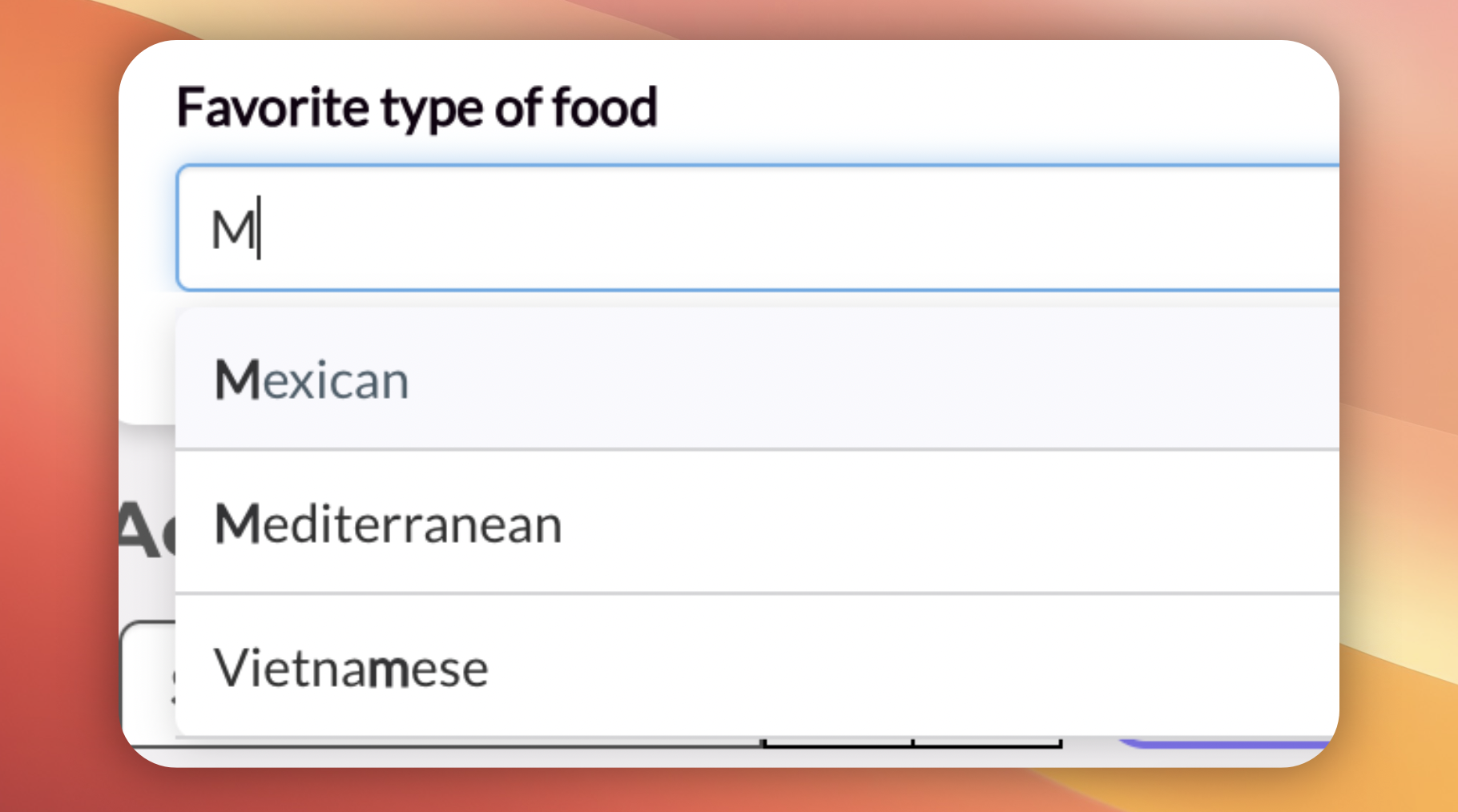
Dropdown fields in registration forms now support inline search. Attendees can start typing to quickly filter and find the value they need instead of scrolling through long lists.
This is especially useful for fields with many options — like countries, companies, or job titles — where finding the right value used to mean scrolling through dozens (or hundreds) of entries. Now it's just a few keystrokes.
Why it matters: Faster form completion means fewer abandoned registrations and a smoother experience for your attendees. Every second saved at the registration step adds up, particularly for high-volume events.
Fixed display issues in group ticket emails
We've resolved several visual issues affecting group ticket confirmation emails, ensuring a polished and consistent experience across email clients. 📧
- Fixed icon sizing and display in group ticket email notifications
- Corrected email layout reflow issues in Gmail to ensure proper rendering
- Improved content alignment and centering within ticket email templates
Fixed Date Picker Issues on Dashboard and Custom Fields
Resolved several date picker bugs that could cause unexpected behavior in key areas of the platform:
- Fixed the date picker on the event dashboard attendance view not rendering correctly
- Fixed the date picker for attendee type custom fields not initializing properly
- Fixed an issue where date pickers could be loaded twice on a single page, which could cause visual glitches or input conflicts
Date selection across dashboards, custom fields, and filter modals should now work reliably in all scenarios. 🛠️
Fixed welcome emails displaying raw HTML code
We resolved an issue where welcome emails with calendar invitations (.ICS files) were displaying raw HTML source code instead of the properly formatted email content. This was particularly noticeable in Outlook and other email clients. 📧
The root cause was related to how the email's MIME structure was being built when attaching calendar files. The email body was being inadvertently converted from HTML to plain text, causing recipients to see unreadable markup instead of the intended styled message.
- Welcome emails with calendar attachments now render correctly across all email clients
- Fixed compatibility issues specifically affecting Outlook users
- Calendar invitation (.ICS) attachments continue to work as expected alongside properly formatted HTML content
Fixed Export Progress Tracking for Attendee Reports
Resolved issues with the Excel export progress indicator for attendee reports. The progress bar now updates smoothly and accurately reflects the current state of your export, providing more reliable feedback while generating large attendee data exports.
Additionally, error messages during the export process are now displayed correctly, so you'll always know if something needs attention.
Fixed attendee payments report on the Dashboard
We resolved an issue with the attendee payments report on the Dashboard that could cause inaccurate data to be displayed. 🛠️
The payments report now correctly reflects attendee registration payment information, ensuring you have reliable and up-to-date financial data when reviewing your event's performance.
Fixed incorrect count of total registered workshops
We resolved a bug that caused the total number of registered workshops to display incorrectly for attendees. 🛠️ The workshop registration count now accurately reflects the actual number of workshops each attendee has signed up for, ensuring reliable data across your event management dashboard.
Banner alignment fix on public pages
Fixed an issue where the banner on public-facing pages (such as the registration page) was not properly centered. The banner now displays correctly aligned, ensuring a polished and professional appearance for your event pages. 🎯
Fixed unpaid attendees display on Dashboard
We resolved an issue where unpaid attendees were not being correctly reflected on the event dashboard. 🛠️
The attendee registration logic has been corrected to ensure that unpaid registrations are now accurately tracked and displayed in your dashboard metrics, giving you a reliable overview of payment statuses across all attendees.
Checkpoints User Interface Polish & Fixes
We've made a series of improvements to the Checkpoints module to ensure a smoother and more reliable experience when managing checkpoints for your events. 🎯
- Fixed checkbox translations across all supported languages (English, Spanish, French, German, Arabic, and more)
- Resolved tooltip display issues on the checkpoints index page
- Fixed type name truncation so long names no longer break the layout in the registration modal
- Improved text column truncation in checkpoint forms and allowed types display for better readability
- Fixed table column alignment in checkpoint logs for a cleaner data view
- Resolved an issue where non-zero validation was not working correctly in checkpoint forms
- Fixed a conflict that prevented saving checkpoints when using the French language
- Corrected form translation issues when creating new checkpoints
These fixes collectively improve the overall usability and visual consistency of the Checkpoints feature across multiple languages and screen sizes.
Checkpoints: Bug Fixes and Translation Improvements
Several fixes have been applied to improve the reliability and localization of the checkpoints module. 🛠️
- Fixed an issue where the register modal would not reload correctly after use
- Fixed the delete action within the register modal to work as expected
- Resolved checkpoint name validation issues
- Corrected and improved translations across all supported languages (EN, ES, FR, DE, AR, JA, PT, ZH-TW, and more)
- Fixed paginator display on the attendee logs page
- Fixed persisted attendee display issues
These fixes ensure a smoother and more reliable experience when managing checkpoints across different languages and workflows.
Fixed date filtering for workshop definitions
We resolved an issue where filtering workshop definitions by date was not working correctly. 🗓️ Date-based filters now return accurate results, ensuring you can reliably search and narrow down workshop definitions based on their scheduled dates.
Fixed Excel export reliability for large attendee lists
We've resolved an issue where Excel exports of large attendee lists could occasionally fail or produce incomplete files. 📄
The export process now includes a brief delay to ensure the generated file is fully saved and available before marking the export as complete. This prevents scenarios where users might download a corrupted or empty file when exporting a high volume of attendees.
- Improved reliability of standard attendee Excel exports
- Improved reliability of Cartier attendee Excel exports
Terms and Conditions checkbox fix
We've fixed an issue with the Terms and Conditions checkbox on the attendee registration form. The checkbox now works correctly, ensuring attendees can properly accept the terms and conditions before completing their registration. ✅
Fixed speaker selection limit in workshop forms
We've fixed an issue where the speaker selection dropdown in workshop forms was incorrectly limiting the number of speakers you could choose. 🎤
You can now properly select all available speakers when creating or editing workshops, without being restricted by an unintended cap on the dropdown options.
Event Cloning Now Respects Security Access & Templates
We've improved the event cloning experience to be more secure and streamlined. Previously, when cloning an event, the selection list could display events you didn't have permission to access. This has been fixed! 🔒
- The event clone selector now properly filters events based on your security access permissions, so you'll only see events you're authorized to clone.
- The clone feature now only displays template events, making it easier to find the right starting point for your new event without sifting through non-template events.
Job Title now available in replace tags
We've fixed an issue where the Job Title field was not being recognized as a valid replace tag. This means you can now seamlessly use the job title placeholder in your email templates, badges, and other customizable content — and it will be correctly replaced with each attendee's actual job title. 🎯
If you previously noticed that job title tags were not being substituted properly, this update resolves that behavior.
Fixed attendee name display in cancellation emails
We've resolved an issue where the attendee's full name was not displaying correctly in cancellation emails. Previously, the name tag in the email template wasn't being replaced with the actual attendee name, which could lead to a confusing experience when receiving a cancellation confirmation. ✉️
Cancellation emails will now correctly show the attendee's full name, ensuring clear and personalized communication.
Fixed workshop duplication issue
We've resolved an issue with the workshop duplication feature that could cause problems when duplicating a workshop definition. Previously, duplicating a workshop could carry over internal references from the original, leading to unexpected behavior or errors.
Now, when you duplicate a workshop, it correctly creates a fresh copy without retaining the original workshop's persisted ID — ensuring that your duplicated workshops behave independently and as expected. 🛠️
🐞 Fixed workshop scheduling validation with timezone support
We've resolved an issue where timezone information was not being properly considered when validating workshop registrations. Previously, attendees could encounter unexpected errors or conflicts when signing up for workshops across different timezones.
With this fix, the system now correctly accounts for timezone differences during workshop scheduling validation, ensuring a smoother and more accurate registration experience. 🕐
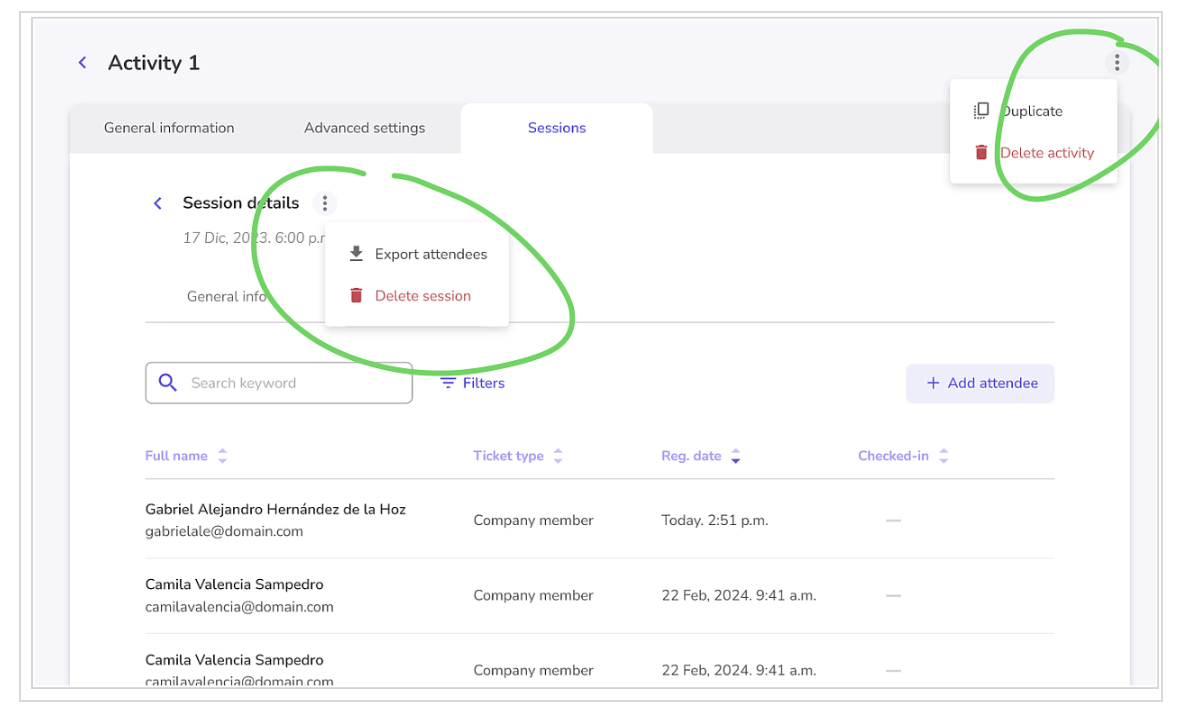
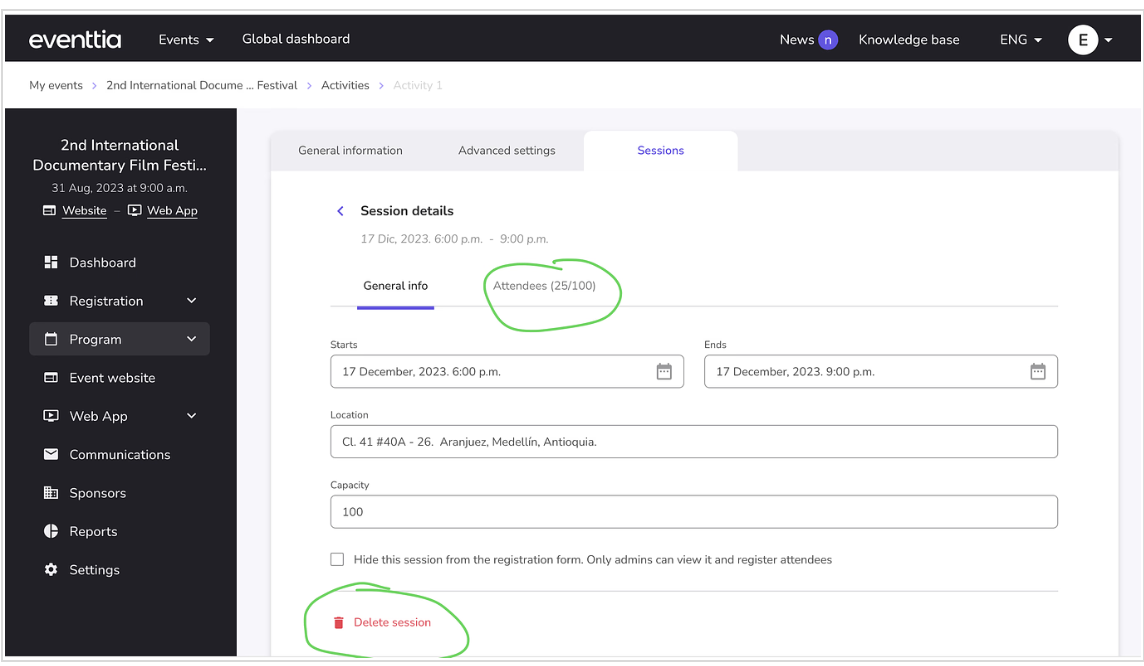
🎯 Streamlined Activity Session Management
We heard you! Managing activity sessions just got a whole lot easier. We've redesigned the interface by consolidating those two confusing menus into a cleaner, more intuitive layout.
Now everything is exactly where you'd expect it to be — no more guessing, no more frustration. Navigate your sessions with confidence and spend less time figuring out the interface and more time crafting unforgettable experiences!
🤝 Error when creating networking slots
We've fixed a technical issue that was occurring when creating networking slots. Everything now runs smoothly, so you can set up your networking sessions without interruptions!
🛡️ Safer Networking Participant Type Deletion
We've added a safety check when deleting networking participant types! Now you can only delete a participant type if no participants are currently assigned to it. This prevents accidental data loss and keeps your networking configurations intact.
Add Participants to Sessions Even After Your Event Ends
Great news for teams with post-event workflows! We have restored the ability to add participants to activities and sessions after your event end date has passed.
Previously, the "Add Participant" button would disappear once the event concluded, which interrupted important internal processes for many of our customers.A
Now you can continue managing your participant lists seamlessly, whether you are reconciling attendance records, adding late registrations, or completing your post-event administrative tasks. Your workflow, your timeline—we have got you covered!
✅ Bug Fix: Workshop Hyperlinks Now Display Correctly in Registration Forms!
Quick fix! We've resolved an issue in the registration form where workshop hyperlinks weren't displaying correctly.
Now your attendees can see and click on workshop links without any problems, making it easier for them to explore your sessions and sign up for what interests them most. 🔗✨
Smooth registration experience restored—just the way you need it!
Happy planning! 📋
🐞 Bug Fix: "Restricted Use" Flag Now Removes Correctly in Checkpoints!
Quick fix for the Checkpoints feature! We've resolved a bug that was preventing the removal of the "Restricted Use" feature flag.
Everything works as expected now—you can add and remove the flag without any issues. 🎯
Thanks for your patience!
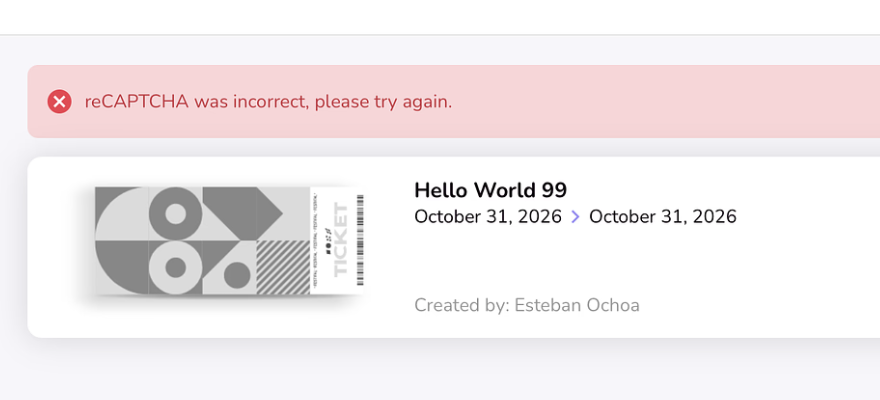
✅ Bug Fix: No More Unexpected reCAPTCHA Message After Login!
Quick fix alert! We've resolved an annoying bug where a reCAPTCHA message was incorrectly appearing even after you logged in successfully.
Now, when you log in, you'll go straight to your dashboard without any confusing pop-ups getting in the way. Smooth and seamless, just as it should be! 🚀
Thanks for your patience—happy planning! ✨
✅ Bug Fix: Attendee Types Now Display Correctly in On-Site App!
Quick update for those of you managing events on the ground! We've fixed a bug in our On-Site app that was causing certain attendee types to not appear on the attendees list page under specific conditions.
Now, no matter the scenario, all your attendee types will display correctly—making check-ins smoother and your registration desk stress-free. 📋✨
📲 Important: To get this fix, please make sure to download the latest version of the mobile app from the App Store or Google Play.
Thanks for your patience, and happy event day! 🎪