
Eventtia Changelog
Eventtia first version release notes
🏇 Cleaner Workshop Selections When Attendee Type Changes
Workshop selections now automatically reset whenever an attendee's type is changed, ensuring registrations stay consistent with the workshops actually available for that type.
Why it matters: this prevents attendees from unintentionally keeping workshop registrations that no longer apply to their new type, avoiding invalid data, scheduling conflicts, and confusing follow-up communications for both organizers and participants.
A Faster, More Reliable Rich Text Editor
We've rolled out a brand-new rich text editor across the platform, giving you a smoother, more modern writing experience wherever you format content in Eventtia.
Why it matters: content creation is at the heart of every event — from sponsor descriptions to workshop details. The new editor loads faster, behaves more consistently across browsers, and reduces the small formatting frustrations that slow you down when building out your event.
- Modernized editing interface with cleaner icons and toolbar
- Improved performance thanks to CDN-delivered assets
- More reliable formatting behavior across sponsors, workshops, and other content areas
- Refined styles for better visual consistency with the rest of the platform
- Translation fixes and QA-driven polish for a smoother day-to-day experience
Event Logo Now Available in Public API
The event logo is now included in the public attributes of the event API, making it easier to display branded event information across integrations and external tools.
Why it matters: Teams building custom event pages, embeds, or third-party integrations can now access the event logo directly through the public API without needing additional authenticated calls, saving development time and ensuring consistent branding everywhere your event appears.
📅 Workshop Calendar Invites Now Add Directly to Attendees' Calendars
Workshop calendar files (.ics) sent to attendees now use the PUBLISH method instead of REQUEST, ensuring events are added smoothly to calendar applications without triggering RSVP prompts or invitation acceptance flows.
Why it matters: Attendees can now save workshop schedules to their calendars with a single click, without confusing 'accept invitation' dialogs. This reduces friction, prevents delivery issues with strict calendar clients, and improves the overall registration experience for your events.
🤖Longer-Lived M2M Tokens for Smoother Integrations
We've extended the expiration time for machine-to-machine (M2M) authentication tokens, giving your integrations more breathing room between token refreshes.
Why it matters: If you rely on API integrations or automated workflows, this change reduces the frequency of token renewals, minimizing interruptions and lowering the risk of failed requests due to expired credentials. Expect fewer authentication hiccups and a more reliable connection between Eventtia and your external systems.
✅ Catch Invalid Phone Numbers Before They Reach Your Event
Attendee and Guest phone numbers are now strictly validated against international formatting standards, so invalid entries are caught at registration instead of surfacing later during check-in, SMS notifications, or reporting.
Why it matters: bad phone data is one of the most common causes of failed communications and messy attendee lists. By validating numbers at the source using Google's libphonenumber standard, you get cleaner data, fewer support tickets, and higher deliverability for every SMS and WhatsApp message you send.
- Strict format verification powered by Phonelib (Google libphonenumber) for Attendee and Guest records.
- Clearer, translated validation messages across all supported languages to help registrants correct mistakes quickly.
- Handles edge cases such as blank values and unusual international formats reliably.
💪 Stronger Validation When Editing Attendees
Attendee edits are now checked more thoroughly across both the public forms and the API, helping prevent bad or inconsistent data from making it into your event records.
Why it matters: cleaner attendee data means fewer surprises at check-in, more reliable communications, and less time spent hunting down and correcting errors after the fact. Organizers and integrators can trust that updates coming through any channel meet the same quality standards.
- Added validation rules to the Attendee model to catch invalid changes before they are saved
- Extended the same validation coverage to the API v3 endpoints (attendees and attendee workshops) so third-party integrations follow the same rules
- Applied consistent checks in the public attendees controller for self-service edits
- Localized validation messages across all supported languages
$ Track Revenue at a Glance with Total Income KPI
The event dashboard now highlights Total Income instead of Ticket Sales as a headline KPI, giving organizers a clearer view of the money actually flowing into their event.
Why it matters: Ticket count alone doesn't tell the full story of an event's financial performance. By surfacing total income directly on the dashboard, organizers can instantly gauge revenue impact without pulling separate reports — saving time and enabling faster, more informed decisions.
🖨️ Faster, More Reliable Badge Printing with Updated DYMO Library
Badge printing at check-in just got smoother. We've upgraded our DYMO thermal printer integration to the latest library, delivering faster print jobs, better printer detection, and fewer connection hiccups during high-traffic on-site registration moments.
Why it matters: On-site teams no longer need to troubleshoot stuck print queues or unresponsive printers in the middle of a rush — attendees get their badges faster, and staff spend less time restarting drivers.
- Updated to the latest DYMO Connect library for improved compatibility with modern printer models and operating systems
- Resolved timeout issues when calling GetPrinters and PrintLabel, so printer discovery and job dispatch respond reliably even under load
- Fixed XML formatting and parameter handling for print jobs, eliminating a class of silent failures where labels wouldn't render correctly
- Improved printer decoding logic for more accurate detection of connected devices
- Applied security hardening to the DYMO connection utilities to protect the printing workflow
Cleaner Payment Totals in Attendee Tags
The total payments tag now displays amounts without the currency symbol, giving you a cleaner numeric value to work with in your communications and templates.
This makes it easier to format payment information exactly the way you want in emails, forms, and other attendee-facing content — no more unwanted currency formatting getting in the way of your custom layouts.
⚡ Faster Workshop Listings
Loading workshop lists through the API is now noticeably faster, so pages and integrations that display workshops respond more quickly, even for events with large catalogs.
What changed under the hood:
- A new lightweight workshop serializer returns only the essential fields needed for list views, reducing payload size and response times.
- Improved caching for workshop responses means repeated requests are served faster and put less load on the system.
Why it matters: attendees browsing workshop schedules and organizers managing large agendas will experience snappier load times, reducing friction during high-traffic moments like registration openings.
Richer Event Data in Webhooks
Attendee webhooks now include custom event field data, giving your integrations access to the same tailored information you collect inside Eventtia.
Why it matters: teams building CRM syncs, analytics pipelines, or automated workflows no longer need extra API calls to fetch custom field values — everything travels together in a single webhook payload, reducing latency and simplifying your integration code.
‼️ Faster Uploads with a 20MB File Size Limit
All file uploads across the platform are now capped at 20MB, ensuring faster performance and preventing failed uploads that waste time and frustrate users and attendees.
Why it matters: Oversized files were a common cause of slow page loads, upload timeouts, and storage bloat. With a consistent 20MB limit enforced both in the browser and on the server, users get instant feedback before waiting on a doomed upload, and events run more smoothly for everyone involved.
- Client-side validation warns users immediately when a file exceeds 20MB, before any upload begins.
- Server-side enforcement ensures the limit is applied consistently across all file inputs, including the new file upload modal.
- Applies to attachments across events, accounts, and app settings for a unified experience.
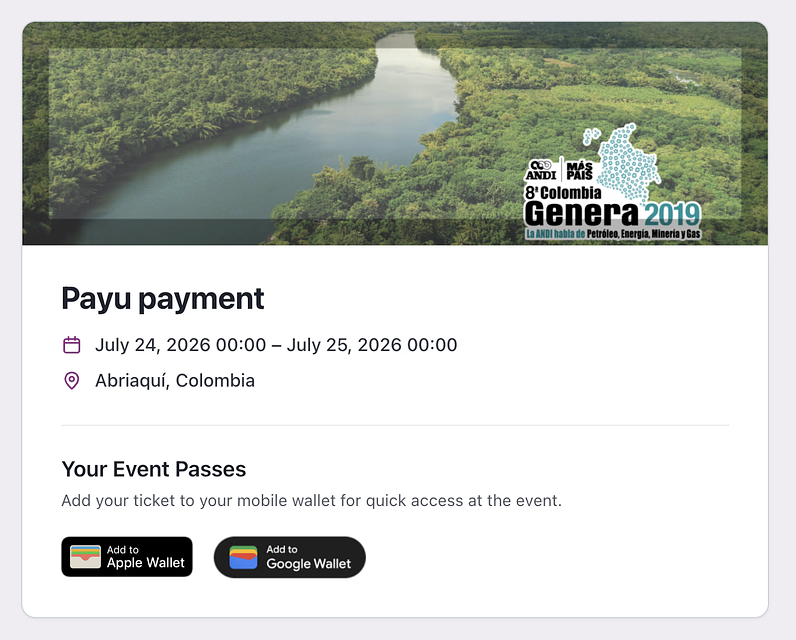
⚡ Add Event Passes to Apple & Google Wallet in One Tap
Attendees now enjoy a smoother, faster experience when saving their event passes to Apple Wallet or Google Wallet, with wallet passes delivered directly as email attachments.
Why it matters: fewer clicks, fewer lost passes, and less confusion on event day. Attendees can add their credentials to their phone the moment they receive the confirmation email, reducing check-in friction and support requests.
- Wallet passes are now attached directly to attendee confirmation and notification emails, so there's no need to open a separate page to download them
- Redesigned wallet buttons offer a clearer, more intuitive download flow on both mobile and desktop
- Improved download experience with better feedback and reliability when saving passes to Apple or Google Wallet
Sold-Out Attendee Types Hidden From Registration
Public registration forms now automatically hide attendee types that have no remaining seats, so attendees only see options they can actually select.
Why it matters: This eliminates the frustration of registrants choosing a ticket type only to discover it's unavailable, reducing drop-offs during registration and cutting down on support requests about sold-out categories.
🎨 A Fresh, Faster Way to Manage Event Files
Event Files has a brand-new look and feel, making it easier than ever to organize, upload, and share documents tied to your events.
Why it matters: managing event documentation is one of those behind-the-scenes tasks that quietly eats up time. The redesigned interface reduces clicks, surfaces what you need faster, and brings Event Files in line with the rest of the modern Eventtia experience — so your team spends less time hunting for files and more time running great events.
- Refreshed file list and category views with a cleaner, more consistent layout
- Redesigned upload modal for a smoother, more intuitive file-adding experience
- Confirmation modal when deleting files and categories to help prevent accidental loss
- Updated empty states so it's clear what to do when a category has no files yet
🎨 Refreshed Email Account Experience
The email account section now sports a modern, cleaner interface designed to make managing your sending domains and SMTP settings faster and more intuitive.
Why it matters: A clearer layout means less time hunting for settings and fewer mistakes when configuring your email infrastructure — so your campaigns get out the door faster.
- Redesigned interface with refreshed icons and visual styling
- Improved navigation across email account configuration screens
- Updated Tailwind styling for a more consistent look and feel
🎨 Cleaner Group Ticket Emails
We've refined how group tickets appear in attendee email notifications, making registration confirmations easier to read and act on.
Why it matters: When attendees receive their group ticket emails, clarity is everything. This update ensures the ticket information is presented in a more polished and consistent way, reducing confusion and follow-up questions from your attendees.
⚡Reliable Attendee Limits Under High Traffic
Attendee registration now holds firm even when hundreds of people sign up at the exact same moment. We've reworked how registration limits are enforced to eliminate race conditions that could previously allow events, tickets, or workshops to exceed their capacity during simultaneous sign-ups.
Why it matters: When a popular event opens registration, dozens of attendees often click 'Register' within the same second. Without proper concurrency controls, multiple requests could each see an available spot and all succeed, leaving organizers to deal with overbooked sessions and disappointed attendees. This update ensures your capacity numbers are the truth, every time.
⚡Faster Event Page Loads
Event pages now load noticeably faster thanks to optimized event parameter queries on the backend.
Why it matters: Less waiting means smoother navigation for organizers managing busy events, and a better first impression for attendees landing on your event pages.
🚨Clearer Workshop Capacity Messages for Attendees
We've refined the messages attendees see when a workshop has reached its registration limit, making them easier to understand across all supported languages.
Why it matters: Clearer wording reduces attendee confusion and support requests when workshops fill up, helping participants quickly understand their options and choose alternative sessions without friction.
🗃️Richer Location Data in Webhook Payloads
Webhook payloads now include detailed location information for both events and attendees, giving your integrations a clearer picture of where things are happening without extra API calls.
Why it matters: external systems like CRMs, analytics tools, and marketing platforms can now segment, route, and report on data by city right out of the box — saving time and reducing the need for follow-up lookups.
- Event webhook payloads now include location and city details
- Attendee webhook payloads now include city information
- Improved city data resolution through a new caching layer for faster, more reliable delivery
🎨 A Fresh, Faster Sponsors Module
The Sponsors module has been fully redesigned to match our latest interface standards, giving you a cleaner, more consistent experience when managing sponsors, sponsor categories, files, and tags.
Why it matters: managing sponsors is one of the most repetitive tasks during event setup. With a refreshed layout, clearer action buttons, and improved forms, your team can move through sponsor configuration with fewer clicks and less visual friction.
- Redesigned sponsor and sponsor category listing pages with better-aligned tables and improved category color display
- New side-screen forms for creating and editing sponsors and sponsor categories, consistent with the rest of the platform
- Refreshed file upload modal and file list for sponsor assets, making it easier to attach and review documents
- Improved tags interface with a smoother editing experience
- Updated breadcrumbs and action buttons across all sponsor-related screens
- Enhanced searchable dropdowns (TomSelect) in sponsor forms for quicker selection
- Localized labels and copy refreshed across all supported languages, including Japanese, Traditional Chinese, Vietnamese, Arabic, German, Spanish, and French
🎨 A Fresh, Faster Way to Manage Coupon Codes
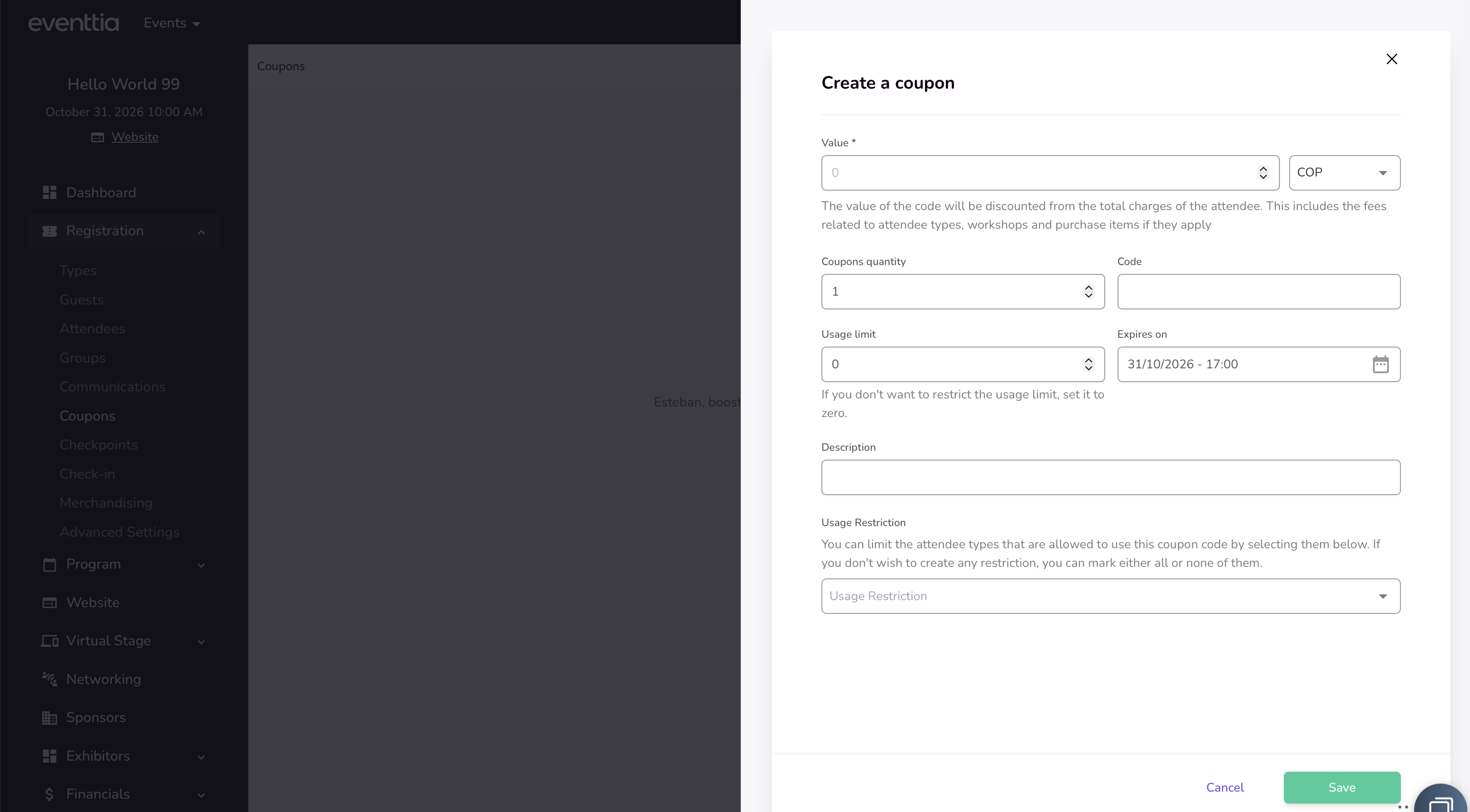
Coupon code management just got a modern makeover. The entire coupon codes section has been redesigned to match the latest Eventtia interface, giving organizers a cleaner, more intuitive workspace for creating, editing, and tracking promotional codes across their events.
Why it matters: managing discounts is now faster and less error-prone, so you can spend less time clicking through forms and more time driving registrations.
- Redesigned coupon codes list view with improved readability and easier scanning
- New streamlined modal for creating coupon codes with clearer field organization
- Refreshed edit screen, including a cleaner "used by" table so you can quickly see which attendees redeemed each code
- Added quick delete action directly from the edit view
- Updated translations across all supported languages for consistent terminology
- Improved Excel export experience for coupon code data
Permission-Based Access for Bulk Welcome Email Resends
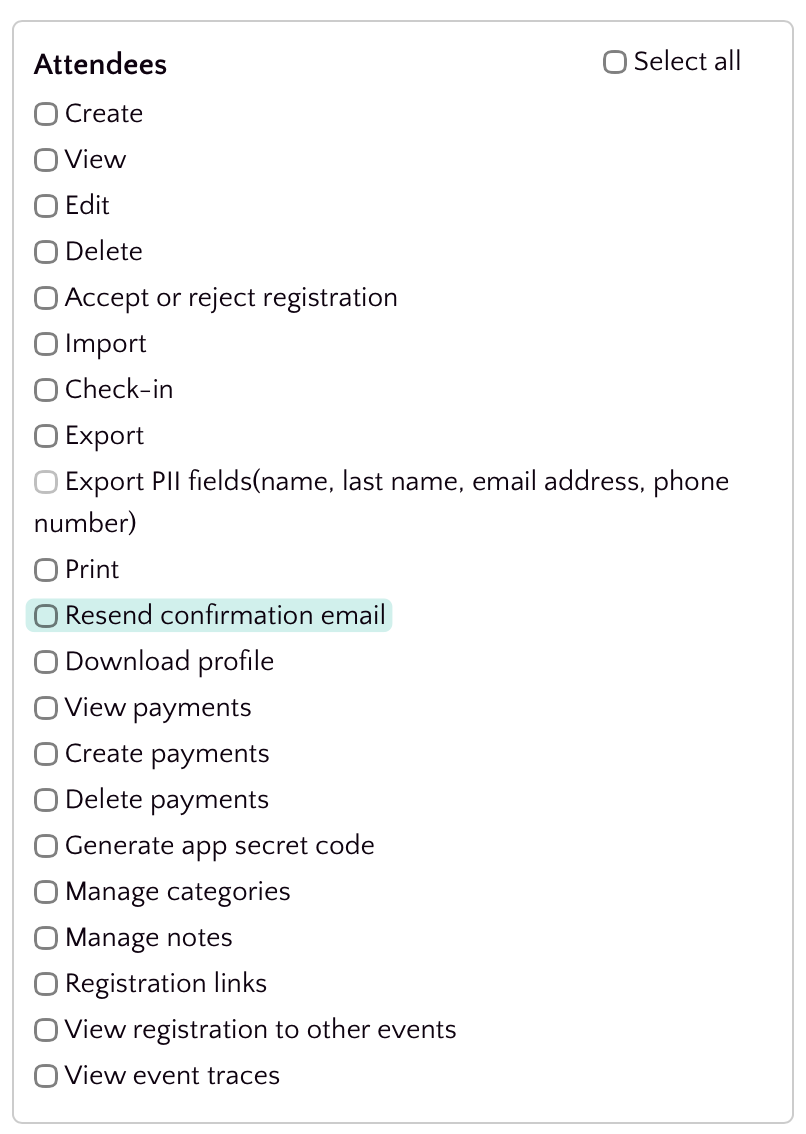
Resending welcome emails to multiple attendees at once is now gated behind a dedicated permission, giving organizers tighter control over who can trigger mass communications from the attendee list.
Why it matters: bulk email actions can have a big impact on attendee experience and deliverability. By requiring an explicit permission, teams can prevent accidental sends, delegate the task safely, and keep a clearer audit trail of who can reach out to attendees in bulk.
🎨 A Cleaner, Faster Way to Manage Program Categories
Program categories just got a fresh, modernized look that makes organizing your event sessions feel effortless. We've redesigned the categories interface from the ground up so you can spend less time hunting for controls and more time building great agendas.
Why it matters: organizing sessions by category is one of the most repeated tasks when setting up an event. A clearer layout, smoother edit experience, and consistent visual style cut down on clicks and confusion, especially for teams managing large multi-track programs.
- Redesigned categories index with an updated, easier-to-scan layout
- New centered modal for editing categories, keeping focus on the task at hand
- Refined alerts and inline messages for clearer feedback when saving changes
- Added a + icon to make creating a new category more discoverable
Faster, More Focused Badge & Stand Reports
Badge and stand reports have been redesigned to give you cleaner layouts, faster exports, and more relevant data — so you can pull the insights you need without wading through clutter.
Why it matters: organizers spend less time wrestling with reports and more time acting on them. Smaller, purpose-built exports also generate faster and are easier to share with sponsors and exhibitors.
- Redesigned attendee type summary report with a clearer, more readable layout
- Stand reports split into four focused exports: Badges, Leads, Requirements, and Summary — each tailored to its audience
- New filter on the attendee type summary report so you can narrow results before exporting
- Updated terminology around reservations metadata for greater consistency across the platform
- Badge and registration reports reorganized under the Registration Reports section for easier navigation
Attendee Location Now Included in Webhook Payloads
Attendee webhook payloads now include location information, so downstream systems receive a more complete picture of each attendee without needing additional API calls.
Why it matters: If you sync attendees to CRMs, marketing tools, or analytics platforms, location data is often essential for segmentation, reporting, and personalization. Including it natively in the webhook payload removes an extra integration step and keeps your data fresher.
Track User Activity with Last Sign-In Data
The /api/v3/users endpoint now returns each user's last sign-in timestamp, giving you immediate visibility into account activity directly from the API response.
Why it matters: teams building integrations, audits, or engagement reports no longer need extra calls or workarounds to know when a user was last active — the data is right where you expect it, making it easier to identify inactive accounts, monitor adoption, and power activity-based workflows.
Cloned Events Keep Their Modules
When you clone an event, your previously enabled modules now carry over automatically — no more reconfiguring from scratch for every new edition of a recurring event.
This saves time and prevents the common mistake of launching a cloned event with missing functionality, ensuring your duplicated events behave exactly like the original from day one.
Refreshed Merchandise Module — Manage Products with a Modern Interface
The Merchandise module has been completely redesigned with a fresh, modern look that makes managing your event products faster and more intuitive. Every screen — from the product listing to creation and editing — now follows our updated design language for a more consistent experience across the platform.
Whether you're setting up ticket add-ons, branded swag, or any purchasable items for your event, you'll notice a cleaner layout, improved forms, and smoother workflows that help you get things done with fewer clicks.
Here's what's new in the updated Merchandise module:
- 🎨 Redesigned product listing page — A cleaner index view with improved column layouts, better price display, and a progress bar for purchase tracking at a glance.
- 📝 Improved product creation & editing forms — The create and edit flows now open in a sleek side-screen modal, making it easy to add or update products without losing context.
- 🔀 Drag-and-drop reordering — You can now rearrange the display order of your merchandise items by simply dragging and dropping them in the list. No more manual sorting!
- 📄 Pagination improvements — The product list now paginates correctly, keeping things fast and organized even when you have a large catalog.
- 🌍 Multi-language support updated — Labels and translations across all supported languages (Arabic, Catalan, German, Spanish, French, and more) have been refreshed to match the new interface.
This redesign reduces the time it takes to set up and manage event merchandise, giving organizers a smoother experience and helping them focus on what matters — delivering a great event.
🎨 Refreshed Stand Requirements Report
The Stand Requirements Summary Report has been redesigned with an updated look and feel, making it easier to review and export booth requirement data for your events.
Whether you're coordinating exhibitor needs or generating reports for your operations team, the refreshed interface provides a cleaner, more intuitive experience — helping you find the information you need faster and with less friction.
- Modernized visual design for the stand requirements summary report
- Improved search and filtering with updated parameter handling
- Refined Excel export process for stand requirement data
- Styling and layout fixes for better readability
Browse Your Registration Report Without Losing Context
The registration report section on your event dashboard is now scrollable, so you can navigate through large datasets without the entire page stretching endlessly.
If you manage events with a high volume of registrations, you've likely experienced an oversized dashboard that made it hard to quickly jump between sections. With this update, the registration report is contained within a scrollable area, keeping the dashboard compact and easy to navigate — so you spend less time scrolling past data and more time acting on it. 📊
🎨 Refreshed Meeting Evaluations Report
The Meeting Evaluations report in the Networking Reports section has been completely redesigned with a modern, cleaner interface that's easier to navigate and faster to use.
If you rely on post-meeting survey data to measure networking quality, you'll now spend less time wrestling with the report and more time acting on insights.
- Redesigned filters and survey selector for quicker access to the data you need
- Improved Excel export with correct .xlsx file extension and accurate progress tracking
- Fixed filtering behavior so reports reflect the correct survey responses
Emoji Validation in Forms and Fields
Input fields across the platform now properly validate and handle emoji characters, preventing unexpected errors or data corruption when attendees or organizers include emojis in their submissions.
This means fewer form submission failures and a smoother experience for everyone — especially in international events where emoji use in names, messages, and notes is common.
💽 Enhanced Event Import Experience
The event import workflow has been significantly improved, giving you a clearer summary view and a more reliable process when bulk-importing event data.
Importing events in bulk is a common need for organizations managing large event portfolios. The updated import flow now includes a detailed summary page so you can review what's being imported before committing, reducing the risk of errors and giving you more confidence in the process.
This means fewer surprises after an import and less time spent manually correcting data issues. 📋
Redesigned Merchandise Report for Faster Insights
The Merchandise (Purchase Items) report has been completely redesigned with a fresh, modern interface — making it easier than ever to review and analyze your event's merchandise sales and purchase data.
Whether you're tracking sold items, filtering by keyword, or exporting data to Excel, the updated report delivers a cleaner experience that helps you find the information you need without the clutter. This means less time wrestling with reports and more time acting on the data that matters.
- ✨ Fully redesigned report UI with a modern look and feel, consistent with the latest Eventtia design standards
- 🔍 Fixed keyword search so filtering purchase items works reliably and returns accurate results
- 📊 Corrected the quantity column display to ensure merchandise quantities are reported accurately
- 📤 Improved Excel export process for merchandise data, delivering more reliable and complete downloads
These improvements apply to the Purchase Items report found under your event's Registration Reports section. No action is needed on your end — the new design is live automatically.
⚡⚡ Faster loading times for networking meeting schedules
We've optimized the way conference meeting data is retrieved, resulting in noticeably faster load times when browsing meeting schedules. ⚡
Events with a large number of meetings should now render more quickly, especially when filtering or navigating through agenda views. This improvement focuses on behind-the-scenes database optimizations that reduce query times for business conference meetings.
Faster and more detailed B2B meeting agenda printing
Printing your B2B meeting agendas is now significantly faster and more informative. We've overhauled the agenda printing process to handle large volumes of data more efficiently and added useful attendee details directly into the printed output.
- 📄 Batch printing support — Agendas are now generated in batches, preventing timeouts and improving reliability when printing large numbers of meeting schedules.
- ⚡ Improved performance — Added attendee type filtering to the agenda rendering process, resulting in faster print generation times.
Speaker Information Now Included in Activity Excel Reports
The activity (workshop) Excel export report has been enhanced to include speaker information. 🎤 When you export your activities to Excel, you'll now see speaker details alongside the existing activity data, giving you a more complete overview of your event's sessions.
This improvement makes it easier to manage and review your event's agenda by having all relevant activity and speaker information consolidated in a single downloadable report.
Redesigned Attendees Report Interface
The Attendees Report has received a complete visual overhaul! 🎨 The report interface has been modernized with a fresh, cleaner design that improves usability and aligns with the latest Eventtia design system.
Key improvements include:
- Redesigned report filters for a more intuitive filtering experience
- Revamped export settings modal with improved layout and visual clarity
- Enhanced progress bar feedback during Excel export generation
- Improved date picker integration within the report filters
- Better handling of horizontal scrolling for reports with many columns
These changes make it easier and more pleasant to generate, filter, and export your attendee data.
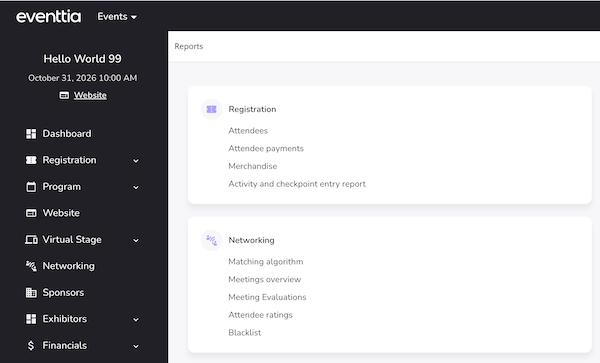
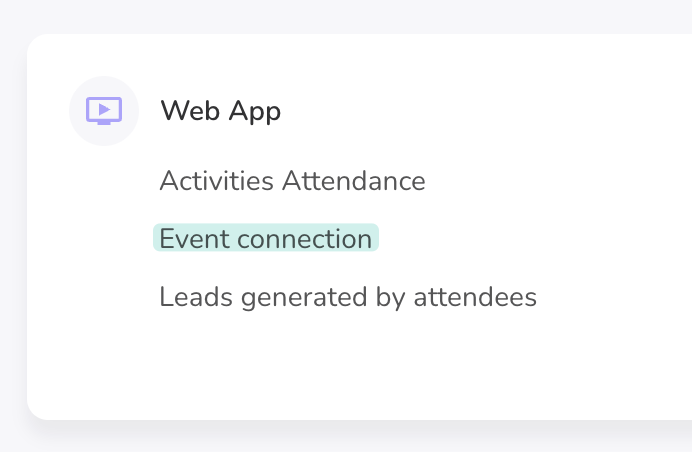
Redesigned Event Connection Report
The Event Connection Report has been completely redesigned with a fresh, modern look and improved usability. This update makes it easier to analyze attendee event traces and connection data at a glance. 📊
- Revamped report interface with a cleaner, more intuitive layout
- Improved filters and modal dialogs for more precise data exploration
- Date filters now use a datepicker component adapted to your event's date format for a smoother experience
- Attendee ID is now included in the Excel export for easier cross-referencing
- Filters are now properly passed through to Excel exports, so your downloaded report matches exactly what you see on screen
- Translation improvements for Japanese and Traditional Chinese
Redesigned Meeting Requests Report
The Meeting Requests report within the Networking Reports section has been completely redesigned with a fresh, modern look and enhanced functionality to help you manage and analyze meeting requests more efficiently. 🎨
- New filters: Easily narrow down meeting requests using updated filter options to quickly find the data you need.
- Excel export: Export your meeting requests data to Excel for offline analysis, sharing with your team, or further reporting.
- Refreshed UI: The meeting requests report and side panel have been reskinned for a cleaner, more intuitive experience that aligns with the latest Eventtia design standards.
These improvements make it easier than ever to track, filter, and export networking activity from your events.
Enhanced Dropdown Selectors for Custom Fields, Country & City
We've upgraded the dropdown selection experience across attendee forms with a modern, searchable selector powered by Tom Select. 🔍 This brings a smoother, faster, and more intuitive way to fill out custom fields, country, and city selections.
- Custom fields with dropdown options now feature a searchable, type-ahead selector — making it easier to find and select values, especially in long lists
- Country and city fields have been upgraded with the same enhanced selector, providing instant search and a cleaner selection experience
- Large select lists now perform better, ensuring smooth interactions even with hundreds of options
- Birthdate fields retain their dedicated date picker for a more appropriate input experience
These improvements reduce the time it takes to complete registration and attendee edit forms, particularly for events with many custom fields or location-based data. ✨
Improved time zone display in welcome emails
We've improved how time zones are displayed in sign-in and welcome emails. ⏰ The time zone information now correctly includes the appropriate symbol (+ or −), making it easier for attendees to quickly identify the event's time zone at a glance.
This ensures a more polished and professional appearance in all event-related communications sent to your participants.
Worksho now allow duplicate names
You can now create multiple workshop with the same name. The unique name restriction has been removed, giving you more flexibility when setting up your workshops. 🎉
This is especially useful when you need to reuse workshop names across different contexts or editions of your events without having to come up with alternative naming conventions.
Redesigned Birthdate Field for Attendee Registration
The birthdate custom field for attendees has been completely redesigned to provide a smoother and more reliable experience across both public registration forms and private admin views. 🎂
The new date picker is more intuitive, properly sized, and correctly positioned on the page — making it easier for attendees to enter their date of birth during registration.
- New date picker component for birthdate fields on both public and private forms
- Minimum age validation support — organizers can now enforce age requirements directly from the custom field configuration
- Date limit enforcement ensures attendees cannot select invalid or out-of-range dates
- Improved birthdate validation logic for more accurate error handling
- Birthdate data is now properly included in attendee Excel exports
These changes ensure that event organizers have more control over attendee age requirements while attendees enjoy a cleaner, more user-friendly registration experience.
Enhanced Activities & Checkpoints Report with Additional Fields
The Activities & Checkpoints report now includes additional attendee fields, giving you richer and more detailed data when exporting your event check-in information. 📊
This enhancement provides more comprehensive insights into attendee activity across your events, making it easier to analyze participation and track engagement without needing to cross-reference multiple reports.
- Additional attendee data fields are now included in the Activities & Checkpoints Excel export
- Multi-language support updated across all supported locales for the new report fields
Dashboard metrics updated for attendee registration
The dashboard metrics for attendee registration have been refined to provide more accurate and relevant insights. 📊 Event organizers can now benefit from improved data representation when reviewing attendee registration activity on their dashboard.
Checkpoints: Redesigned Interface
The checkpoints section has received a comprehensive visual overhaul ✨ for a more modern and intuitive experience. The refreshed design makes it easier to manage your event checkpoints at a glance.
- Redesigned checkpoint index page with improved layout and clearer information hierarchy
- Updated checkpoint creation and editing modal with a cleaner look and feel
- Improved attendee logs view with better styling and pagination fixes
- New action buttons and breadcrumb navigation for smoother workflow
- Tooltips added to checkpoint names for better readability when names are long
- Text truncation applied to capacity and type name fields for a cleaner table appearance
Status filters in the logs view have been migrated to TomSelect for a more consistent and user-friendly dropdown experience.